> ## Documentation Index
> Fetch the complete documentation index at: https://docs.metronome.com/llms.txt
> Use this file to discover all available pages before exploring further.
# Invoice with Stripe
Use Metronome’s native [Stripe](https://stripe.com/) integration to invoice your customers with Stripe. With the Stripe integration, when an invoice finalizes at the end of the billing period, Metronome automatically creates a corresponding invoice in Stripe to collect payment.
Leveraging the advanced invoicing capabilities of Stripe helps you reduce your involuntary churn by maximizing your payment success rate for scenarios like pay-as-you-go customers.
This guide describes how to set up Stripe as your external billing provider, interact with the integration, and understand how Metronome handles Stripe limits.
## Set up the Stripe integration
Setting up the Stripe integration involves connecting Metronome and Stripe and configuring invoice settings.
### Connect Metronome and Stripe
When you connect your Stripe account with Metronome, Metronome can automatically create invoices in Stripe. Connecting involves granting Metronome the permissions to write and read data on your behalf to your Stripe account.
Clients commonly connect Stripe to Metronome production and sandbox environments. This enables them to test potential price changes or other invoice updates end-to-end before enabling them for production customers. When you set up the Stripe integration in Metronome Sandbox, Metronome automatically connects to your Stripe test mode so you can test your integration end-to-end with invoice creation and payment collection.
To connect Metronome and Stripe:
1. Authenticate your Stripe account from Metronome. Go to [General Settings - Integrations](https://app.metronome.com/settings/general/integrations) → click **Enable** and complete the Stripe wizard.
2. Set up a Stripe connection from each Metronome environment you want to send invoices through, like production and sandbox environments.
3. Enable Stripe's [automatic payment retry](https://stripe.com/docs/billing/revenue-recovery/smart-retries) capabilities to improve invoice payment success.
### Connecting Metronome to Multiple Stripe Accounts
Metronome supports multi-entity billing with Stripe so you can connect your Metronome environment to many Stripe accounts. This feature enables complex enterprises to manage their billing and finances as distinct business units. To set up multiple Stripe accounts:
1. Go to **Connections - > Integrations**
2. Select **Stripe - > Add another**
3. Select the appropriate Stripe account
Once complete, you will see a row in **Active Integrations** for each Stripe account that Metronome is connected to. You can create an alias for each account to identify them. For example: **Stripe NA** and **Stripe EU** . This alias will appear wherever the Stripe account is referenced in the Metronome App.
**WARNING**
If using multi-entity billing, you must use `delivery_method_id` when setting the customer billing configuration. Ensure that your customer sign-up flow uses this field before setting up multi-entity billing. See [set customer billing configuration](/integrations/invoice-integrations/stripe#set-the-customer-billing-configuration%E2%80%8B) for more details.
### Configure optional global integration settings available
After connecting Metronome to Stripe, you have certain options that you can configure from the [General Settings - Integrations page](https://app.metronome.com/settings/general/integrations). If connected to multiple Stripe accounts, you will need to configure the settings for each account independently.
| **Invoice settings** | |
| ----------------------------------------------- | --------------------------------------------------------------------------------------------------------------------------------------------------------------------------------------------------------------------------------------------------------------------------------------------------------------------------------------------------------------------------------------------------------------------------------------------------------------------------------------------------------------------------------------------------------------------------------------------- |
| **Set invoice due date** | Stripe defaults to invoice due dates within 30 days after they're sent. You can change this option to a different value. This setting has no effect for customers configured to be charged automatically. |
| **Leave invoices as drafts** | By default, Metronome sends all invoices to Stripe with the `auto_advance` option set to true allowing invoices to be finalized in Stripe immediately without any action required on your side. If you prefer to leave invoices as draft so you can review and finalize manually in Stripe, mark the "leave invoices as drafts" option in Metronome. Metronome sets the Stripe `auto_advance` to false. |
| **Skip zero-total invoices** | If Stripe invoicing is enabled for a customer, all invoices finalized in Metronome are sent to Stripe by default. The "skip zero-total invoices" option limits this to only send non-zero invoice. Stripe [imposes limits](https://docs.stripe.com/currencies#minimum-and-maximum-charge-amounts) on the minimum charge amounts. For example, with USD currency, the minimum charge allowed is \$0.50. If you select "skip zero-total invoices," Metronome skips sending invoices to Stripe that fall below the minimum charge amount for the currency. |
| **Align effective\_at with last day of period** | By default, Stripe populates the "Invoice Date" field on PDF invoices and `effective_at` in the API with the date the invoice is finalized. Use this setting to populate the `effective_at` field with the last date of the invoice's service period (like Oct 31 for an Oct 1-31 invoice). This can help ensure usage invoices are tracked against the correct accounting period, aligning with revenue recognition practices in downstream finance systems. This setting isn't supported with Stripe Tax due to a Stripe limitation that causes invoice syncing to fail. |
| **Invoice Presentation** | |
| ------------------------------------------------------------------------------------------ | ------------------------------------------------------------------------------------------------------------------------------------------------------------------------------------------------------------------------------------------------------------------------------------------------------------------------------------------------------------ |
| **Display line items with zero quantity on Stripe invoices** | If selected, Metronome creates a Stripe line item on the Stripe invoices for all charges, including the ones that have zero quantity. |
| **Always display price and quantity information in Stripe invoice line item descriptions** | Because Stripe doesn't support decimal quantities, by default, Metronome displays quantities in line item descriptions if at least one quantity on an invoice is not an integer. By selecting "always display quantities in line items", quantities will always appear in line item names, regardless of whether the invoice has any non-integer quantities. |
**INFO**
These settings are enforced per Stripe account at the environment level. You cannot configure customer specific preferences.
### Create optional entity mapping rules
By default, Metronome sets metadata on Stripe invoices objects that it creates. One item it sets is a `metronome_id`, which is the Metronome invoice ID that lets you map a Stripe invoice to its corresponding Metronome invoice.
You may want to add additional metadata to Stripe entities. For example:
* Add attributes like the contract name or contract ID to the Stripe invoice (visible to customers) by mapping Metronome contract or rate card custom fields to [Stripe invoice custom fields](https://docs.stripe.com/invoicing/customize#custom-fields).
* Add metadata like invoice line item and invoice line item price objects to the Stripe invoice for your internal audits or for downstream integrations like tax calculation.
To configure Metronome to automatically add your own additional metadata to Stripe entities, edit the Stripe integration mapping rules between Metronome custom fields and Stripe entities on the [General Settings - Integrations page](https://app.metronome.com/settings/general/integrations).
**If connected to multiple Stripe accounts, you will need to configure each of these mappings individually.**
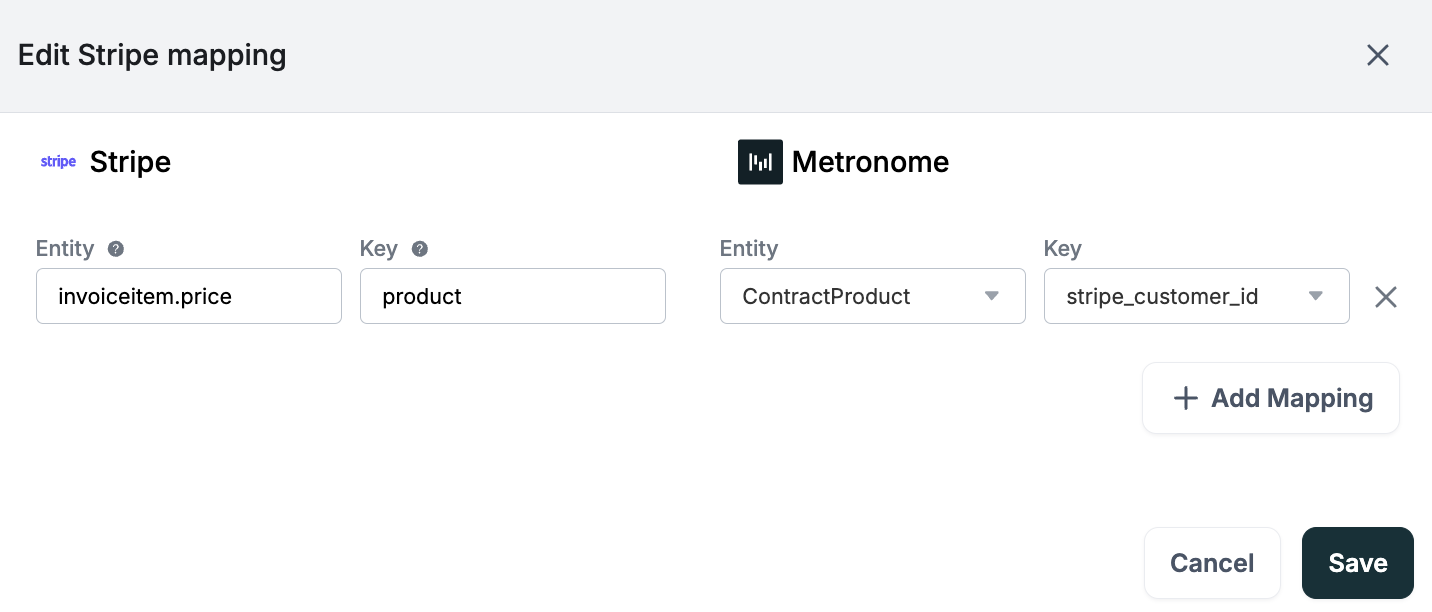
**Assign line items to Stripe products example**
A common use case for adding metadata to Stripe entities is assigning line items on a Metronome invoice to an existing product in Stripe. To do this:
1. Create a [custom field](/api-reference/custom-fields) key on the Metronome product entity: `stripe_product_id`.
2. Set the value for the custom field key you just created for each of your products in Metronome.
3. Go to the [General Settings - Integrations page](https://app.metronome.com/settings/general/integrations) and edit the mapping rules to map the Metronome custom field key `stripe_product_id` to Stripe `invoiceitem.price` .
**Required for payment-gated commits**
If you use [payment-gated commits](/guides/pricing-packaging/apply-credits-and-commits/manual-payment-gated-commits), every Metronome product used on a payment-gated commit **must** have a `stripe_product_id` custom field mapped to a valid Stripe Product ID. Without this mapping, Stripe cannot generate the invoice line item and the payment attempt will fail, voiding the commit.
 ### Set the customer billing configuration
To determine which invoices to send to Stripe, Metronome looks at the `billing_configuration` for each customer. The `billing_configuration` is an object within the Metronome customer object that captures additional metadata necessary to support Metronome’s native integrations. This includes information like the billing provider `customer.id` and invoice preferences. If the customer’s `billing_configuration` is set to Stripe, a [Stripe invoice](https://stripe.com/docs/api/invoices) gets issued to the corresponding Stripe customer.
Set the billing configuration for a customer in the [Metronome app](https://app.metronome.com/) or with the API.
**INFO**
If connected to multiple Stripe accounts, you can only set the billing configuration via the API.
For the API, set this configuration during the customer creation process using the `/customers`endpoint or after the customer already exists with `/setCustomerBillingProviderConfigurations` [setting the billing configuration](/api-reference/customers/set-billing-provider-configurations-for-a-customer).
To set the a billing configuration, Metronome requires you to either specify a `delivery_method` or `delivery_method_id`. If you are only connecting to a single Stripe account, use the `delivery_method`. If connecting to multiple Stripe accounts, you must use `delivery_method_id`. Metronome uses this ID to determine which Stripe account each invoice should be sent to.
**INFO**
You can find the `delivery_method_id` by using the `/listConfiguredBillingProviders` endpoint to fetch configured Stripe accounts in the Metronome environment.
This example payload uses the `/customers` endpoint to set the billing configuration using `delivery_method`:
```bash theme={null}
curl https://api.metronome.com/v1/customers \
-H "Authorization: Bearer " \
-H "Content-Type: application/json" \
-d '{
"ingest_aliases": [
"team@example.com"
],
"name": "Example, Inc.",
"customer_billing_provider_configurations": [{
"billing_provider": "stripe",
"configuration": {
"stripe_customer_id": "cus_456",
"stripe_collection_method": "charge_automatically"
},
"delivery_method": "direct_to_billing_provider"
}]
}'
```
This next example payload uses the `/setCustomerBillingProviderConfigurations` to set the billing configuration of an existing client using `delivery_method_id`:
```bash theme={null}
curl https://api.metronome.com/v1/setCustomerBillingProviderConfigurations \
-H "Authorization: Bearer " \
-H "Content-Type: application/json" \
-d '{
"data": [
{
"customer_id": "4db51251-61de-4bfe-b9ce-495e244f3491",
"billing_provider": "stripe",
"configuration": {
"stripe_customer_id": "cus_1234",
"stripe_collection_method": "charge_automatically"
},
"delivery_method_id": "5b95d955-b705-41c8-9d2e-34ccbdee5193"
}
]
}'
```
The billing configuration consists of two fields that dictate how the Stripe invoice is created:
* `stripe_customer_id`: The Stripe customer ID for the customer that gets issued a Stripe invoice.
* `stripe_collection_method`: Determines how to collect payment for the customer. Stripe supports two [methods of collection](https://stripe.com/docs/api/invoices/object):
* `charge_automatically`: Stripe attempts to charge for the invoice using the default payment method attached to the customer.
`charge_automatically` requires a [default payment method](https://docs.stripe.com/api/customers/update#update_customer-invoice_settings-default_payment_method) to be set on the Stripe customer before the invoice is finalized. If no default payment method is configured, Stripe can't charge the invoice and payment will fail. Confirm the customer has a default payment method in Stripe before using this collection method.
* `send_invoice`: Stripe emails this invoice to the customer with payment instructions. For the `send_invoice` option you must specify how many days a customer has until payment is due. This corresponds with the `days_until_due` field in the Stripe API. By default, Stripe invoices are due 30 days after creation. The Metronome API doesn't allow you to set this value directly, but you can update this setting on the [General Settings - Integrations page](https://app.metronome.com/settings/general/integrations).
### Set the contract billing configuration
Metronome supports configuring the billing on the contract level. This allows you to optimize the billing for each contract: you may send pay-as-you-go contracts through Stripe but enterprise-level contracts through AWS.
This example payload uses the `/contracts/create` endpoint to set the billing configuration:
```bash theme={null}
curl https://api.metronome.com/v1/contracts/create \
-H "Authorization: Bearer " \
-H "Content-Type: application/json" \
-d '{
"customer_id": "6ae46ff3-a73e-4553-a139-346eafcea608",
"rate_card_id": "cfe45e46-0277-42e0-b66a-45ccbd028913",
"starting_at": "2025-01-01T00:00:00.000Z",
"billing_provider_configuration": {
"billing_provider": "stripe",
"delivery_method": "direct_to_billing_provider"
}
}'
```
If connected to multiple Stripe accounts, one customer may be mapped to multiple Stripe accounts. When creating the contract, use the `billing_configuration_id` which can be fetched from the `/getCustomerBillingProviderConfigurations` endpoint:
```bash theme={null}
curl https://api.metronome.com/v1/contracts/create \
-H "Authorization: Bearer " \
-H "Content-Type: application/json" \
-d '{
"customer_id": "6ae46ff3-a73e-4553-a139-346eafcea608",
"rate_card_id": "cfe45e46-0277-42e0-b66a-45ccbd028913",
"starting_at": "2025-01-01T00:00:00.000Z",
"billing_provider_configuration": {
"billing_provider_configuration_id": "561ea579-e830-41d9-9161-d35313c061c5"
}
}'
```
### Adding a billing provider to an existing contract
When you add a billing provider configuration to an existing contract, Metronome does **not** retroactively send previously finalized invoices to Stripe. Only invoices that finalize after the configuration is added to the contract are sent to Stripe.
The first invoice sent to Stripe is the in-arrears usage invoice for the billing period in which the configuration was added. For example:
| Date | Event |
| --------- | --------------------------------------------------------- |
| Jan 1 | Contract starts |
| Feb 1 | Billing provider configuration created |
| Apr 15 | Configuration added to contract |
| **May 1** | **First invoice sent to Stripe** (April in-arrears usage) |
Metronome determines the first invoice to send based on when the configuration was added to the contract, not when the contract started or when the configuration was created.
## Interact with the Stripe integration
After connecting Stripe with Metronome, use the Metronome API and app to interact with your integration.
### Track Stripe invoice statuses in Metronome
Metronome captures Stripe webhook events when the status of an invoice changes.
The Stripe invoices statuses are accessible in Metronome as part of the response when fetching invoices from the [list invoices](/api-reference/invoices/list-invoices) API endpoint.
```json theme={null}
{
"id": "INVOICE_ID",
...
"external_invoice": {
"billing_provider_type": "stripe",
"invoice_id": "in_123",
"issued_at_timestamp": "2024-09-30T16:40:40.30184+00:00",
"external_status": "PAID"
},
...
}
```
These statuses are accessible in your data warehouse through the Metronome [data export](/guides/reporting-insights/data-export). They include:
| **Stripe Webhook Event** | **external\_status in Metronome** |
| ------------------------------------------------------------------------------------------------------------------ | --------------------------------- |
| [invoice.finalized](https://stripe.com/docs/api/events/types#event_types-invoice.finalized) | FINALIZED |
| [invoice.marked\_uncollectible](https://stripe.com/docs/api/events/types#event_types-invoice.marked_uncollectible) | UNCOLLECTIBLE |
| [invoice.paid](https://stripe.com/docs/api/events/types#event_types-invoice.paid) | PAID |
| [invoice.payment\_failed](https://stripe.com/docs/api/events/types#event_types-invoice.payment_failed) | PAYMENT\_FAILED |
| [invoice.payment\_succeeded](https://stripe.com/docs/api/events/types#event_types-invoice.payment_succeeded) | PAID |
| [invoice.voided](https://stripe.com/docs/api/events/types#event_types-invoice.voided) | VOID |
| [invoice.deleted](https://stripe.com/docs/api/events/types#event_types-invoiceitem.deleted) | DELETED |
**INFO**
If the global configuration is set to `Leave invoices as drafts`, Stripe does not return a status and you won't see a Stripe invoice status in Metronome.
### Calculate dynamic sales tax
Metronome’s native Stripe integration supports Anrok, Avalara, and Stripe Tax providers to add tax to an invoice created in Stripe. Which one you use depends on your invoice provider and compliance needs:
| Provider | Invoicing integration |
| ------------------------------------------------------------------------------------ | ------------------------------------------------------------------------------ |
| [Stripe Tax](https://docs.stripe.com/tax/set-up) | Yes |
| [Anrok](https://www.anrok.com/integrations/stripe) | Yes (through [Stripe app](https://marketplace.stripe.com/apps/anrok)) |
| [Avalara](https://www.avalara.com/us/en/products/integrations/stripe-invoicing.html) | Yes (through [Stripe app](https://marketplace.stripe.com/apps/avalara-avatax)) |
Regardless of which provider you choose, the general flow when using Stripe invoicing is:
1. Metronome usage statement finalizes, creating a corresponding draft invoice in Stripe.
2. Metronome passes entity mapping data (product IDs, metadata) to the Stripe invoice.
3. Your tax provider calculates tax on the Stripe invoice.
4. The invoice is finalized in Stripe with tax included.
For setup instructions, see the dedicated guide for your provider: [Stripe Tax](/integrations/tax-integrations/stripe-tax), [Anrok](/integrations/tax-integrations/anrok), or [Avalara](/integrations/tax-integrations/avalara).
When integrating with Avalara or Anrok directly through Stripe (not via a Stripe app), Metronome allows up to one hour by default for tax to be applied to draft invoices before finalizing. Note that after one hour, the invoice is finalized in Stripe. If you prefer to keep these invoices in a draft state indefinitely, enable the "[Leave invoices as drafts](/integrations/invoice-integrations/stripe#configure-optional-global-integration-settings-available)" option in your Stripe integration settings.
If you use a tax provider not listed above, or if you’re not using Stripe for invoicing, contact your Metronome representative for guidance on configuring tax.
### Payment timing for `charge_automatically` invoices
Metronome finalizes invoices immediately at the end of the billing period — there is no wait before the invoice is sent to Stripe. However, when Metronome sends a finalized invoice to Stripe with `charge_automatically`, Stripe waits **up to one hour** after delivering the `invoice.created` webhook before attempting payment. The invoice sits in `open` state during that window.
This delay is a Stripe-side behavior that applies specifically to invoices that are manually finalized through the API (which is how Metronome submits all invoices today). It is not configurable in the Stripe Dashboard — the "grace period" setting in Stripe only controls the draft → finalized transition, not the finalized → payment-attempted transition.
This delay does **not** apply to:
* [Auto-recharge invoices](/guides/customers-billing/optimize-customer-experience/auto-recharge-options).
* [Payment-gated commits](/guides/pricing-packaging/apply-credits-and-commits/manual-payment-gated-commits), where payment is collected manually.
**If you see delays longer than an hour:** Stripe falls back to a **72-hour** wait when the `invoice.created` webhook delivery fails. If invoices are sitting in `open` well past an hour, check that your Stripe webhook endpoint is configured correctly and is returning a 2xx response.
**Workaround to bypass the one-hour wait:** Confirm the payment intent yourself immediately after the invoice is finalized:
1. Listen for the Stripe `invoice.finalized` or `payment_intent.created` webhook.
2. Extract the `payment_intent` ID from the event payload.
3. Call [`POST /v1/payment_intents/:id/confirm`](https://docs.stripe.com/api/payment_intents/confirm) on the Stripe API.
This reduces the time between finalization and payment attempt to a few seconds.
### Listen for Errors
Invoicing errors can happen. For example, errors happen when Stripe customers don’t exist. To receive notifications from Metronome when an error sending an invoice to Stripe occurs, listen for the [webhook](/guides/platform-configuration/setup-webhooks#webhook-types) type `invoice.billing_provider_error` . When receiving those webhooks, trigger internal notifications and actions to ensure proper invoicing of your customers.
## How Metronome handles Stripe limitations
Stripe enforces certain limits on invoices that may cause discrepancies or issues when billing customers. This table describes how Metronome handles these limitations.
| Stripe limitation | Metronome approach |
| ---------------------------------------------------------------- | ---------------------------------------------------------------------------------------------------------------------------------------------------------------------------------------------------------------------------------------------------------------------------------------------------------------------------------------------------------------------------------------------------------- |
| **Stripe does not support decimal quantities** | If the quantity is a decimal for at least one line item on the invoice, Metronome sets the quantity as 1 for all the Stripe line items on the invoice. Metronome and provides the true quantity as part of each line item description. |
| **Stripe imposes a maximum of 250 line items on their invoices** | If a customer invoice in Metronome exceeds 250 line items, the invoice is collapsed into one line item, labeled with your company name and the invoice total as the associated price. Provide full invoice visibility (with all line items) to your customers with [dashboards](/guides/customers-billing/optimize-customer-experience/customer-dashboards-and-reporting) that expose invoices in your UI. |
| **Stripe does not allow a charge above 999,999.99 USD** | Metronome generates an error when creating an invoice with an amount above the Stripe maximum. Contact your Stripe representative and Metronome representative to increase the limit if you need invoices with amounts above \$999,999.99. |
| **No native support for issuing credit memos with Metronome** | The Metronome integration does not natively support issuing credit memos in Stripe. Learn more how to [issue credit memos](/guides/invoices/invoice-optimization/issue-credit-memos). |
### Set the customer billing configuration
To determine which invoices to send to Stripe, Metronome looks at the `billing_configuration` for each customer. The `billing_configuration` is an object within the Metronome customer object that captures additional metadata necessary to support Metronome’s native integrations. This includes information like the billing provider `customer.id` and invoice preferences. If the customer’s `billing_configuration` is set to Stripe, a [Stripe invoice](https://stripe.com/docs/api/invoices) gets issued to the corresponding Stripe customer.
Set the billing configuration for a customer in the [Metronome app](https://app.metronome.com/) or with the API.
**INFO**
If connected to multiple Stripe accounts, you can only set the billing configuration via the API.
For the API, set this configuration during the customer creation process using the `/customers`endpoint or after the customer already exists with `/setCustomerBillingProviderConfigurations` [setting the billing configuration](/api-reference/customers/set-billing-provider-configurations-for-a-customer).
To set the a billing configuration, Metronome requires you to either specify a `delivery_method` or `delivery_method_id`. If you are only connecting to a single Stripe account, use the `delivery_method`. If connecting to multiple Stripe accounts, you must use `delivery_method_id`. Metronome uses this ID to determine which Stripe account each invoice should be sent to.
**INFO**
You can find the `delivery_method_id` by using the `/listConfiguredBillingProviders` endpoint to fetch configured Stripe accounts in the Metronome environment.
This example payload uses the `/customers` endpoint to set the billing configuration using `delivery_method`:
```bash theme={null}
curl https://api.metronome.com/v1/customers \
-H "Authorization: Bearer " \
-H "Content-Type: application/json" \
-d '{
"ingest_aliases": [
"team@example.com"
],
"name": "Example, Inc.",
"customer_billing_provider_configurations": [{
"billing_provider": "stripe",
"configuration": {
"stripe_customer_id": "cus_456",
"stripe_collection_method": "charge_automatically"
},
"delivery_method": "direct_to_billing_provider"
}]
}'
```
This next example payload uses the `/setCustomerBillingProviderConfigurations` to set the billing configuration of an existing client using `delivery_method_id`:
```bash theme={null}
curl https://api.metronome.com/v1/setCustomerBillingProviderConfigurations \
-H "Authorization: Bearer " \
-H "Content-Type: application/json" \
-d '{
"data": [
{
"customer_id": "4db51251-61de-4bfe-b9ce-495e244f3491",
"billing_provider": "stripe",
"configuration": {
"stripe_customer_id": "cus_1234",
"stripe_collection_method": "charge_automatically"
},
"delivery_method_id": "5b95d955-b705-41c8-9d2e-34ccbdee5193"
}
]
}'
```
The billing configuration consists of two fields that dictate how the Stripe invoice is created:
* `stripe_customer_id`: The Stripe customer ID for the customer that gets issued a Stripe invoice.
* `stripe_collection_method`: Determines how to collect payment for the customer. Stripe supports two [methods of collection](https://stripe.com/docs/api/invoices/object):
* `charge_automatically`: Stripe attempts to charge for the invoice using the default payment method attached to the customer.
`charge_automatically` requires a [default payment method](https://docs.stripe.com/api/customers/update#update_customer-invoice_settings-default_payment_method) to be set on the Stripe customer before the invoice is finalized. If no default payment method is configured, Stripe can't charge the invoice and payment will fail. Confirm the customer has a default payment method in Stripe before using this collection method.
* `send_invoice`: Stripe emails this invoice to the customer with payment instructions. For the `send_invoice` option you must specify how many days a customer has until payment is due. This corresponds with the `days_until_due` field in the Stripe API. By default, Stripe invoices are due 30 days after creation. The Metronome API doesn't allow you to set this value directly, but you can update this setting on the [General Settings - Integrations page](https://app.metronome.com/settings/general/integrations).
### Set the contract billing configuration
Metronome supports configuring the billing on the contract level. This allows you to optimize the billing for each contract: you may send pay-as-you-go contracts through Stripe but enterprise-level contracts through AWS.
This example payload uses the `/contracts/create` endpoint to set the billing configuration:
```bash theme={null}
curl https://api.metronome.com/v1/contracts/create \
-H "Authorization: Bearer " \
-H "Content-Type: application/json" \
-d '{
"customer_id": "6ae46ff3-a73e-4553-a139-346eafcea608",
"rate_card_id": "cfe45e46-0277-42e0-b66a-45ccbd028913",
"starting_at": "2025-01-01T00:00:00.000Z",
"billing_provider_configuration": {
"billing_provider": "stripe",
"delivery_method": "direct_to_billing_provider"
}
}'
```
If connected to multiple Stripe accounts, one customer may be mapped to multiple Stripe accounts. When creating the contract, use the `billing_configuration_id` which can be fetched from the `/getCustomerBillingProviderConfigurations` endpoint:
```bash theme={null}
curl https://api.metronome.com/v1/contracts/create \
-H "Authorization: Bearer " \
-H "Content-Type: application/json" \
-d '{
"customer_id": "6ae46ff3-a73e-4553-a139-346eafcea608",
"rate_card_id": "cfe45e46-0277-42e0-b66a-45ccbd028913",
"starting_at": "2025-01-01T00:00:00.000Z",
"billing_provider_configuration": {
"billing_provider_configuration_id": "561ea579-e830-41d9-9161-d35313c061c5"
}
}'
```
### Adding a billing provider to an existing contract
When you add a billing provider configuration to an existing contract, Metronome does **not** retroactively send previously finalized invoices to Stripe. Only invoices that finalize after the configuration is added to the contract are sent to Stripe.
The first invoice sent to Stripe is the in-arrears usage invoice for the billing period in which the configuration was added. For example:
| Date | Event |
| --------- | --------------------------------------------------------- |
| Jan 1 | Contract starts |
| Feb 1 | Billing provider configuration created |
| Apr 15 | Configuration added to contract |
| **May 1** | **First invoice sent to Stripe** (April in-arrears usage) |
Metronome determines the first invoice to send based on when the configuration was added to the contract, not when the contract started or when the configuration was created.
## Interact with the Stripe integration
After connecting Stripe with Metronome, use the Metronome API and app to interact with your integration.
### Track Stripe invoice statuses in Metronome
Metronome captures Stripe webhook events when the status of an invoice changes.
The Stripe invoices statuses are accessible in Metronome as part of the response when fetching invoices from the [list invoices](/api-reference/invoices/list-invoices) API endpoint.
```json theme={null}
{
"id": "INVOICE_ID",
...
"external_invoice": {
"billing_provider_type": "stripe",
"invoice_id": "in_123",
"issued_at_timestamp": "2024-09-30T16:40:40.30184+00:00",
"external_status": "PAID"
},
...
}
```
These statuses are accessible in your data warehouse through the Metronome [data export](/guides/reporting-insights/data-export). They include:
| **Stripe Webhook Event** | **external\_status in Metronome** |
| ------------------------------------------------------------------------------------------------------------------ | --------------------------------- |
| [invoice.finalized](https://stripe.com/docs/api/events/types#event_types-invoice.finalized) | FINALIZED |
| [invoice.marked\_uncollectible](https://stripe.com/docs/api/events/types#event_types-invoice.marked_uncollectible) | UNCOLLECTIBLE |
| [invoice.paid](https://stripe.com/docs/api/events/types#event_types-invoice.paid) | PAID |
| [invoice.payment\_failed](https://stripe.com/docs/api/events/types#event_types-invoice.payment_failed) | PAYMENT\_FAILED |
| [invoice.payment\_succeeded](https://stripe.com/docs/api/events/types#event_types-invoice.payment_succeeded) | PAID |
| [invoice.voided](https://stripe.com/docs/api/events/types#event_types-invoice.voided) | VOID |
| [invoice.deleted](https://stripe.com/docs/api/events/types#event_types-invoiceitem.deleted) | DELETED |
**INFO**
If the global configuration is set to `Leave invoices as drafts`, Stripe does not return a status and you won't see a Stripe invoice status in Metronome.
### Calculate dynamic sales tax
Metronome’s native Stripe integration supports Anrok, Avalara, and Stripe Tax providers to add tax to an invoice created in Stripe. Which one you use depends on your invoice provider and compliance needs:
| Provider | Invoicing integration |
| ------------------------------------------------------------------------------------ | ------------------------------------------------------------------------------ |
| [Stripe Tax](https://docs.stripe.com/tax/set-up) | Yes |
| [Anrok](https://www.anrok.com/integrations/stripe) | Yes (through [Stripe app](https://marketplace.stripe.com/apps/anrok)) |
| [Avalara](https://www.avalara.com/us/en/products/integrations/stripe-invoicing.html) | Yes (through [Stripe app](https://marketplace.stripe.com/apps/avalara-avatax)) |
Regardless of which provider you choose, the general flow when using Stripe invoicing is:
1. Metronome usage statement finalizes, creating a corresponding draft invoice in Stripe.
2. Metronome passes entity mapping data (product IDs, metadata) to the Stripe invoice.
3. Your tax provider calculates tax on the Stripe invoice.
4. The invoice is finalized in Stripe with tax included.
For setup instructions, see the dedicated guide for your provider: [Stripe Tax](/integrations/tax-integrations/stripe-tax), [Anrok](/integrations/tax-integrations/anrok), or [Avalara](/integrations/tax-integrations/avalara).
When integrating with Avalara or Anrok directly through Stripe (not via a Stripe app), Metronome allows up to one hour by default for tax to be applied to draft invoices before finalizing. Note that after one hour, the invoice is finalized in Stripe. If you prefer to keep these invoices in a draft state indefinitely, enable the "[Leave invoices as drafts](/integrations/invoice-integrations/stripe#configure-optional-global-integration-settings-available)" option in your Stripe integration settings.
If you use a tax provider not listed above, or if you’re not using Stripe for invoicing, contact your Metronome representative for guidance on configuring tax.
### Payment timing for `charge_automatically` invoices
Metronome finalizes invoices immediately at the end of the billing period — there is no wait before the invoice is sent to Stripe. However, when Metronome sends a finalized invoice to Stripe with `charge_automatically`, Stripe waits **up to one hour** after delivering the `invoice.created` webhook before attempting payment. The invoice sits in `open` state during that window.
This delay is a Stripe-side behavior that applies specifically to invoices that are manually finalized through the API (which is how Metronome submits all invoices today). It is not configurable in the Stripe Dashboard — the "grace period" setting in Stripe only controls the draft → finalized transition, not the finalized → payment-attempted transition.
This delay does **not** apply to:
* [Auto-recharge invoices](/guides/customers-billing/optimize-customer-experience/auto-recharge-options).
* [Payment-gated commits](/guides/pricing-packaging/apply-credits-and-commits/manual-payment-gated-commits), where payment is collected manually.
**If you see delays longer than an hour:** Stripe falls back to a **72-hour** wait when the `invoice.created` webhook delivery fails. If invoices are sitting in `open` well past an hour, check that your Stripe webhook endpoint is configured correctly and is returning a 2xx response.
**Workaround to bypass the one-hour wait:** Confirm the payment intent yourself immediately after the invoice is finalized:
1. Listen for the Stripe `invoice.finalized` or `payment_intent.created` webhook.
2. Extract the `payment_intent` ID from the event payload.
3. Call [`POST /v1/payment_intents/:id/confirm`](https://docs.stripe.com/api/payment_intents/confirm) on the Stripe API.
This reduces the time between finalization and payment attempt to a few seconds.
### Listen for Errors
Invoicing errors can happen. For example, errors happen when Stripe customers don’t exist. To receive notifications from Metronome when an error sending an invoice to Stripe occurs, listen for the [webhook](/guides/platform-configuration/setup-webhooks#webhook-types) type `invoice.billing_provider_error` . When receiving those webhooks, trigger internal notifications and actions to ensure proper invoicing of your customers.
## How Metronome handles Stripe limitations
Stripe enforces certain limits on invoices that may cause discrepancies or issues when billing customers. This table describes how Metronome handles these limitations.
| Stripe limitation | Metronome approach |
| ---------------------------------------------------------------- | ---------------------------------------------------------------------------------------------------------------------------------------------------------------------------------------------------------------------------------------------------------------------------------------------------------------------------------------------------------------------------------------------------------- |
| **Stripe does not support decimal quantities** | If the quantity is a decimal for at least one line item on the invoice, Metronome sets the quantity as 1 for all the Stripe line items on the invoice. Metronome and provides the true quantity as part of each line item description. |
| **Stripe imposes a maximum of 250 line items on their invoices** | If a customer invoice in Metronome exceeds 250 line items, the invoice is collapsed into one line item, labeled with your company name and the invoice total as the associated price. Provide full invoice visibility (with all line items) to your customers with [dashboards](/guides/customers-billing/optimize-customer-experience/customer-dashboards-and-reporting) that expose invoices in your UI. |
| **Stripe does not allow a charge above 999,999.99 USD** | Metronome generates an error when creating an invoice with an amount above the Stripe maximum. Contact your Stripe representative and Metronome representative to increase the limit if you need invoices with amounts above \$999,999.99. |
| **No native support for issuing credit memos with Metronome** | The Metronome integration does not natively support issuing credit memos in Stripe. Learn more how to [issue credit memos](/guides/invoices/invoice-optimization/issue-credit-memos). |