> ## Documentation Index
> Fetch the complete documentation index at: https://docs.metronome.com/llms.txt
> Use this file to discover all available pages before exploring further.
# Set currencies and custom pricing units
export const List = ({marker, children}) => {
return <>
;
};
You can create custom pricing units and use different currencies when building a rate card in Metronome. Doing so ensures that billing aligns with the unique needs of your products and services, no matter where your customers are located.
Pricing using custom units can decouple pricing from currency fluctuations and provide a standardized unit of value that's understandable across all markets. This approach simplifies pricing logic for customers to understand how their usage translates into cost.
## Supported currencies
Use different currencies to provide a localized billing experience for your global customers. Metering on local currency eliminates confusion around conversion rates and provides a customer-centric billing approach for international customers. Metronome supports these currencies:
| USD | AUD | BRL | CAD |
| --- | --- | --- | --- |
| CHF | CZK | EUR | GBP |
| INR | MXN | NGN | NOK |
| PLN | SEK | TRY | ZAR |
| NZD | SGD | | |
### Currency denomination
All monetary values in the Metronome API are expressed in the **smallest denomination** (minor unit) of the currency. For USD, this means values are in **cents** — so \$1.00 is represented as `100`. This applies to all API fields that represent monetary amounts, including `total`, `unit_price`, `amount`, and `threshold`.
**USD uses cents, but most other currencies use whole units**
USD is the only currency in Metronome that uses cents (minor units) by default. All other supported fiat currencies — such as EUR, GBP, and CAD — use **whole currency units**. For example, €10.00 EUR is represented as `10`, not `1000`.
When working with multiple currencies, make sure your integration accounts for this difference. Do not assume that dividing by 100 applies to all currencies.
The denomination for each currency is reflected in the pricing unit name returned by the API. For example, USD returns as `"USD (cents)"`, indicating values are in cents. Other currencies return their standard code (for example, `"EUR"`) without a denomination qualifier, indicating values are in whole units.
## Use custom pricing units
To use custom pricing units:
1. Create a custom pricing unit in the [Metronome app](https://app.metronome.com/).
* Go to **Offering → Pricing units → Custom pricing units →** and click **Add**.
* Name your new pricing unit as you want it to appear on Metronome invoices.
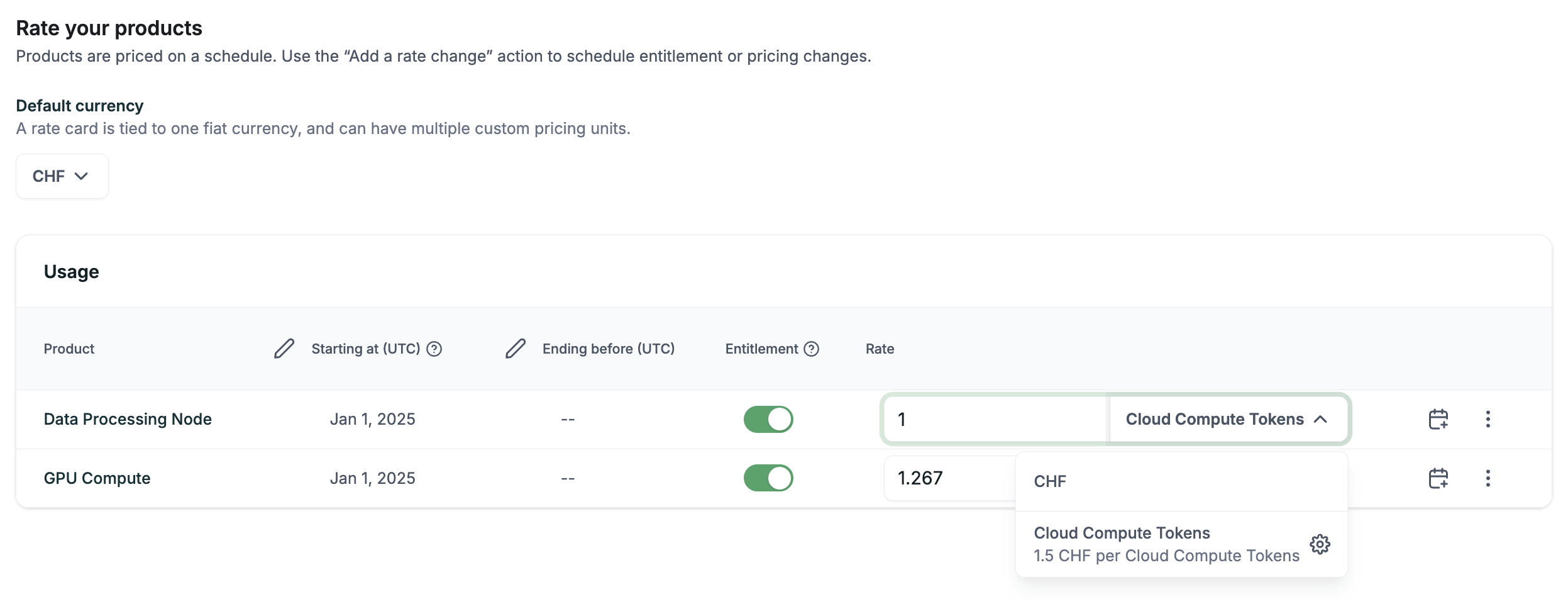
2. [Create a rate card](/guides/get-started/core-concepts/create-manage-rate-cards) and set the rate card’s fiat currency. Each rate card is associated with one fiat currency.
* Add rates to the rate card in either the chosen fiat currency or custom pricing units.
* If the rate is a custom pricing unit, define a conversion rate from the underlying fiat currency.
**NOTE**
Once the rate is saved in one pricing unit for a given product, you cannot
change the pricing unit for that rate afterwards.
 3. Click **Save**.
## Example: Use custom pricing units and currencies in commits or credits
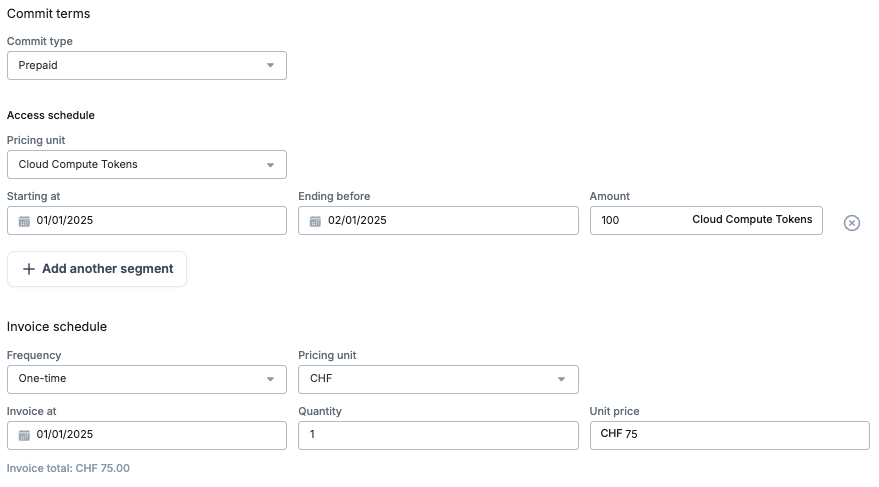
Credits and prepaid commits, on a contract or at the customer level, can have access schedules in custom pricing units and select currencies. For example, you can have a prepaid commit, paid for in CHF, that gives access to 100 Cloud Compute Tokens.
3. Click **Save**.
## Example: Use custom pricing units and currencies in commits or credits
Credits and prepaid commits, on a contract or at the customer level, can have access schedules in custom pricing units and select currencies. For example, you can have a prepaid commit, paid for in CHF, that gives access to 100 Cloud Compute Tokens.
 ## Example: Invoice with custom pricing units and currencies
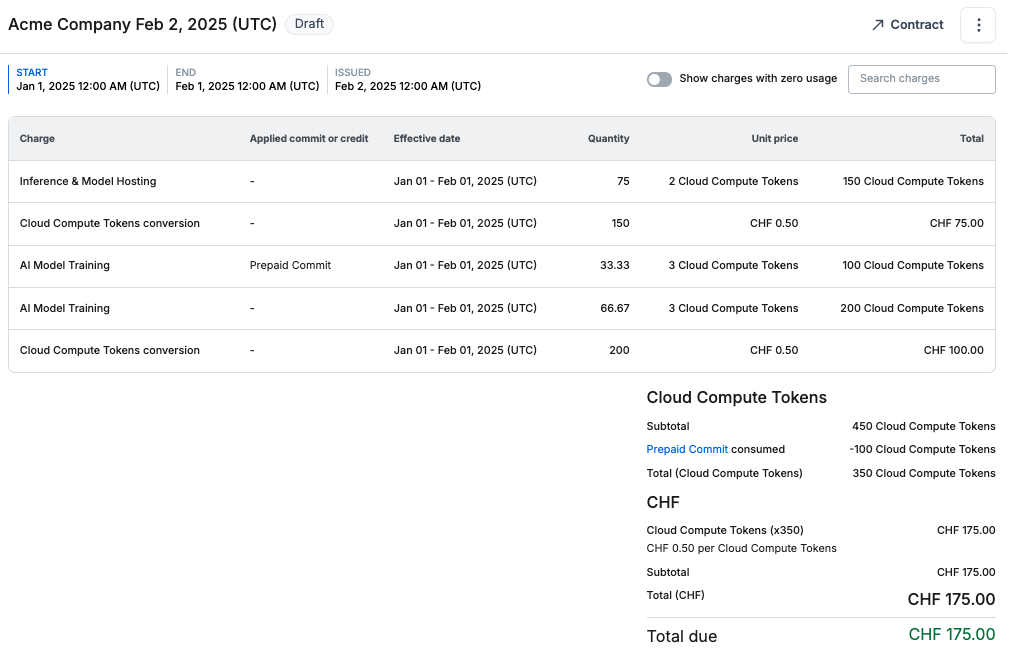
Usage of a product with custom pricing unit rates burns down credits and prepaid commits with access schedules in that custom pricing unit. For example, 100 Cloud Compute Tokens was burned down by the AI Model Training usage.
If there are no applicable credits or prepaid commits with access schedules in that custom pricing unit, a conversion line item is added to calculate the cost in the specified fiat currency set on the rate card.
For Acme’s invoice, after burning down all prepaid commits, the remaining total of 350 Cloud Compute tokens is converted to the fiat currency and is the total due.
## Example: Invoice with custom pricing units and currencies
Usage of a product with custom pricing unit rates burns down credits and prepaid commits with access schedules in that custom pricing unit. For example, 100 Cloud Compute Tokens was burned down by the AI Model Training usage.
If there are no applicable credits or prepaid commits with access schedules in that custom pricing unit, a conversion line item is added to calculate the cost in the specified fiat currency set on the rate card.
For Acme’s invoice, after burning down all prepaid commits, the remaining total of 350 Cloud Compute tokens is converted to the fiat currency and is the total due.