> ## Documentation Index
> Fetch the complete documentation index at: https://docs.metronome.com/llms.txt
> Use this file to discover all available pages before exploring further.
# Build with the Metronome SDKs
Metronome provides powerful software development kits (SDKs) designed to seamlessly integrate Metronome billing APIs into your applications. The SDKs for Python, Go, Ruby, and Node.js offer developers flexible options for implementing Metronome's capabilities across platforms and environments.
This page walks through a basic but powerful usage-based billing system in Python, Node, Ruby, or Golang:
1. Install and configure the Metronome SDK.
2. Send usage events to Metronome, laying the foundation for consumption-based billing.
3. Create a billable metric to define how Metronome should aggregate and measure usage.
4. Create a customer in the system and associate them with usage events.
5. Set up pricing and packing for your product.
6. Create a contract for the customer, enabling automatic invoice generation based on their usage.
## SDK features
Each SDK GitHub repository contains detailed documentation, examples, and resources to help you make the most of Metronome in your applications:
* [Python SDK](https://github.com/Metronome-Industries/metronome-python/blob/main/README.md)
* [Go SDK](https://github.com/Metronome-Industries/metronome-go/blob/main/README.md)
* [Ruby SDK](https://github.com/Metronome-Industries/metronome-ruby/blob/main/README.md)
* [Node.js SDK](https://github.com/Metronome-Industries/metronome-node/blob/main/README.md)
Core SDK features include:
* **Strong typing of Metronome endpoints and objects** enhance developer productivity with better autocomplete and IDE support for Metronome objects.
* **Pagination support** simplifies the process of retrieving and managing paginated data from Metronome services.
* **Automatic retry support** by default retries each request upon failure up to three times. You can configure it to any number of retries. Use this to automatically handle transient errors and network issues without needing to implement retry logic.
While this guide covered the fundamentals, Metronome offers much more functionality to model different business models. Check out the SDK repo to see what’s possible.
## 1. Install and configure the SDK
First install and configure the SDK in your environment:
```bash Python theme={null}
pip install --pre metronome-sdk
```
```bash Node theme={null}
npm install @metronome/sdk
```
```bash Ruby theme={null}
gem install metronome-sdk
```
```bash Go theme={null}
go get -u 'github.com/Metronome-Industries/metronome-go'
```
Next, configure the SDK by passing a valid [API key](/api-reference/authorization) as the authorization bearer token. By default, the SDK looks for the API key under the environment variable `METRONOME_BEARER_TOKEN`. In this example, it'll be passed as an argument to the constructor instead.
```python Python theme={null}
from metronome import Metronome
client = Metronome(
# Defaults to os.environ.get("METRONOME_BEARER_TOKEN") if omitted
bearer_token="My bearer token",
)
```
```javascript Node theme={null}
import Metronome from '@metronome/sdk'
const client = new Metronome({
// Defaults to os.environ.get("METRONOME_BEARER_TOKEN") if omitted
bearerToken: "My bearer token",
});
```
```ruby Ruby theme={null}
require "bundler/setup"
require "metronome_sdk"
metronome = MetronomeSDK::Client.new(
bearer_token: "My Bearer Token" # defaults to ENV["METRONOME_BEARER_TOKEN"]
)
```
```go Go theme={null}
package main
import (
"context"
"github.com/Metronome-Industries/metronome-go"
"github.com/Metronome-Industries/metronome-go/option"
)
func main() {
client := metronome.NewClient(
option.WithBearerToken("My bearer token"), // defaults to os.LookupEnv("METRONOME_BEARER_TOKEN") if omitted
)
}
```
## 2. Send usage events
The usage-based billing model builds upon captured usage data from users on your platform. Metronome accepts usage payloads of all formats through the [/ingest](/api-reference/usage/ingest-events) endpoint.
Use the SDK to send data to Metronome:
```python Python theme={null}
response = client.v1.usage.ingest(
usage=[
{
"transaction_id": "9995a70e-a2c5-4904-b96d-70de446f420e",
"timestamp": "2024-08-01T00:00:00Z",
"customer_id": "team@example.com",
"event_type": "language_model",
"properties": {
"model": "langModel4",
"user_id": "johndoe",
"tokens": 1000000
}
}
]
)
```
```javascript Node theme={null}
async function main() {
await client.V1.usage.ingest([
{
transaction_id: '9995a70e-a2c5-4904-b96d-70de446f420e',
timestamp: "2024-08-01T00:00:00.000Z",
customer_id: 'team@example.com',
event_type: 'language_model',
properties: {
model: "langModel4",
user_id: "johndoe",
tokens: 1000000
}
},
]);
}
main();
```
```ruby Ruby theme={null}
result = metronome.v1.usage.ingest(
usage: [
{
transaction_id: '9995a70e-a2c5-4904-b96d-70de446f420e',
timestamp: "2024-08-01T00:00:00.000Z",
customer_id: 'team@example.com',
event_type: 'language_model',
properties: {
model: "langModel4",
user_id: "johndoe",
tokens: 1000000
}
}
]
)
puts(result)
```
```go Go theme={null}
err := client.V1.Usage.Ingest(context.TODO(), metronome.UsageIngestParams{
Usage: []metronome.UsageIngestParamsUsage{{
TransactionID: metronome.F("9995a70e-a2c5-4904-b96d-70de446f420e"),
Timestamp: metronome.F("2024-08-01T00:00:00Z"),
CustomerID: metronome.F("team@example.com"),
EventType: metronome.F("language_model"),
Properties: metronome.F(map[string]interface{}{
"model": "langModel4",
"user_id": "johndoe",
"tokens": 1000000,
}),
}},
})
if err != nil {
panic(err.Error())
}
```
The properties used in this example include:
* `usage`, allows you to pass in multiple event payloads in a request. Metronome supports passing up to 100 events within a single request.
* `transaction_id`, provides Metronome with the unique idempotency key for the event. Metronome deduplicates based on this ID, allowing you to send events potentially many times without worrying about double-charging your customers.
* `timestamp`, the time when the event occurred. Send in events with any timestamp up to 34 days in the past.
* `customer_id`, the customer ID in Metronome or any other customer identifier you want to define. For example, customer email or internal customer ID within your platform. Later steps show how to define these custom identifiers for your customers in Metronome.
* `event_type`, an arbitrary string that you can define within the request.
* `properties`, an arbitrary set of data to include within the payload for metering and grouping within Metronome.
Success with Metronome depends on the data you provide, so it's important to design [usage events](/guides/events/design-usage-events) well.
To view all events sent to Metronome, go to the **Events tab** in the [Metronome app](https://app.metronome.com/).
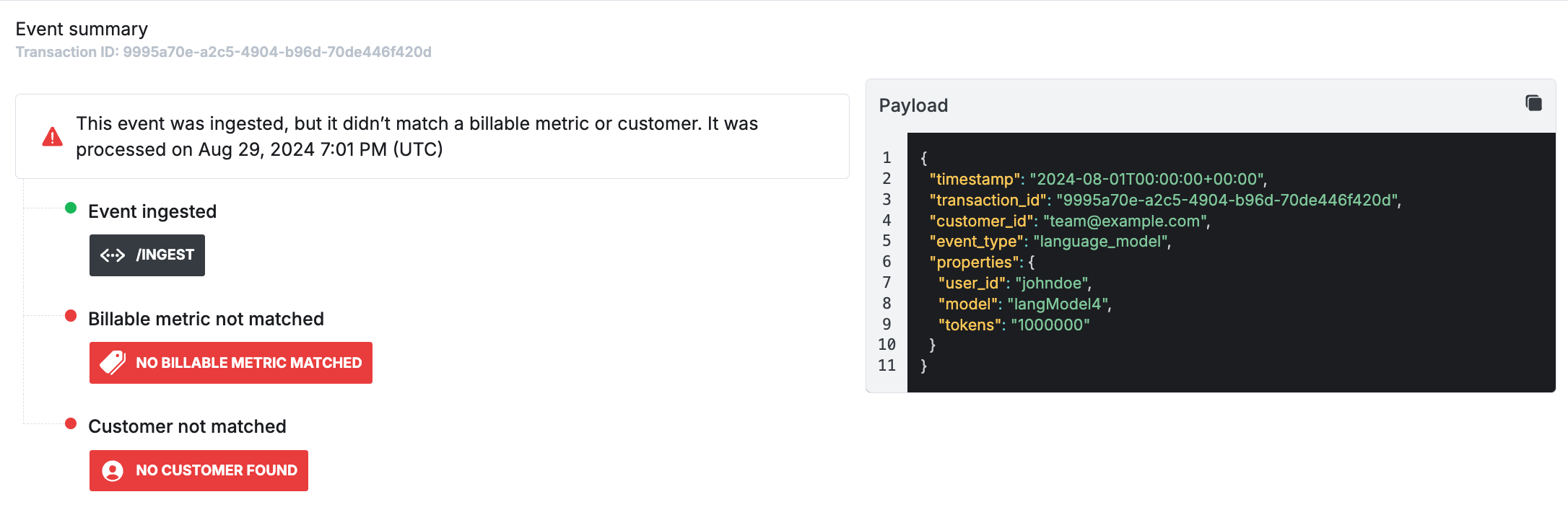
For the event sent in the example, it successfully made it into the Metronome system. But, it hasn’t been matched yet with a metric to start metering or a customer in the system.
 ## 3. Create a billable metric
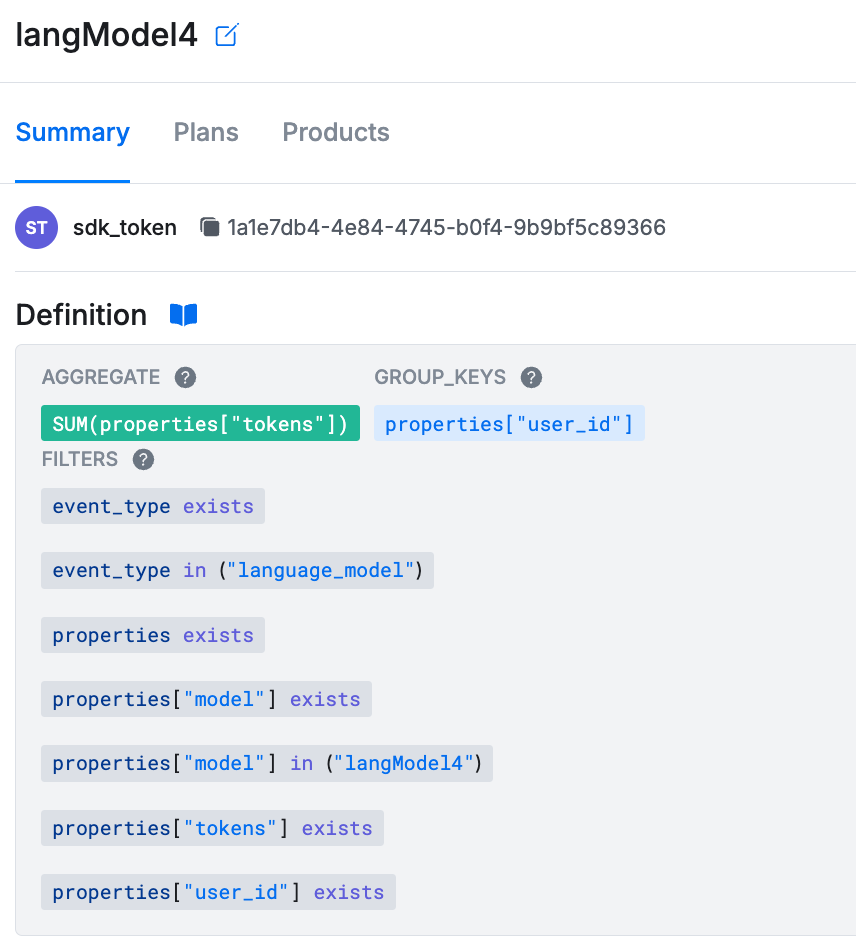
A billable metric describes a per-customer aggregation over a subset of usage events. By configuring a billable metric, you instruct Metronome how to match usage events to products you charge for.
Here’s an example billable metric configuration that matches against the usage event sent in the previous example:
```python Python theme={null}
response = client.v1.billable_metrics.create(
name="langModel4",
event_type_filter={
"in_values": [
"language_model"
]
},
property_filters=[
{
"name": "model",
"exists": True,
"in_values": [
"langModel4"
]
},
{
"name": "user_id",
"exists": True
},
{
"name": "tokens",
"exists": True
}
],
aggregation_key="tokens",
aggregation_type="SUM",
group_keys=[
["user_id"]
]
)
billable_metric_id = response.data.id
```
```javascript Node theme={null}
const billableMetricsResponse = await client.V1.billableMetrics.create({
name: "langModel4",
event_type_filter: {
in_values: [
"language_model"
]
},
property_filters: [
{
name: "model",
exists: true,
in_values: [
"langModel4"
]
},
{
name: "user_id",
exists: true
},
{
name: "tokens",
exists: true,
}
],
aggregation_key: "tokens",
aggregation_type: "SUM",
group_keys: [
["user_id"]
]
});
const billableMetricId = billableMetricsResponse.data.id;
```
```ruby Ruby theme={null}
response = client.v1.billable_metrics.create(
name: "langModel4",
event_type_filter: {
in_values: [
"language_model"
]
},
property_filters: [
{
name: "model",
exists: true,
in_values: [
"langModel4"
]
},
{
name: "user_id",
exists: true
},
{
name: "tokens",
exists: true
}
],
aggregation_key: "tokens",
aggregation_type: "SUM",
group_keys: [
["user_id"]
]
)
billable_metric_id = response.data.id
```
```go Go theme={null}
billableMetricResponse, err := client.V1.BillableMetrics.New(context.TODO(), metronome.BillableMetricNewParams{
Name: metronome.F("langModel4"),
EventTypeFilter: metronome.F(metronome.EventTypeFilterParam{
InValues: metronome.F([]string{"language_model"}),
}),
PropertyFilters: metronome.F([]metronome.PropertyFilterParam{
{
Name: metronome.F("model"),
Exists: metronome.F(true),
InValues: metronome.F([]string{
"langModel4",
}),
},
{
Name: metronome.F("user_id"),
Exists: metronome.F(true),
},
{
Name: metronome.F("tokens"),
Exists: metronome.F(true),
},
}),
AggregationKey: metronome.F("tokens"),
AggregationType: metronome.F(metronome.BillableMetricNewParamsAggregationTypeSum),
})
if err != nil {
panic(err.Error())
}
billableMetricID := billableMetricResponse.Data.ID
```
The properties used in the code include:
* `name`, the name to give your billable metric.
* `event_type_filter`, the set of values that matched against the `event_type` field in the usage events. Omit this if you want to match against all event types.
* `property_filters`, the set of properties you expect to find on the usage payload. If you mark a property as `exists=True` in the billable metric definition and the property not found on the payload, the billable metric won’t match to the event.
* `aggregation_key`, used to define the property with the relevant value to aggregate on.
* `aggregation_type`, used to tell Metronome how to aggregate the values specified by the `aggregation_key` as they come into the system. Supported operations are `SUM`, `COUNT`, and `MAX`.
* `group_keys`, used to define properties to separate the usage data into different buckets, similar to a `group by` clause in SQL. The example above set `user_id` as a group key, so you can display the invoice separated by the amount of tokens that each user consumed.
## 3. Create a billable metric
A billable metric describes a per-customer aggregation over a subset of usage events. By configuring a billable metric, you instruct Metronome how to match usage events to products you charge for.
Here’s an example billable metric configuration that matches against the usage event sent in the previous example:
```python Python theme={null}
response = client.v1.billable_metrics.create(
name="langModel4",
event_type_filter={
"in_values": [
"language_model"
]
},
property_filters=[
{
"name": "model",
"exists": True,
"in_values": [
"langModel4"
]
},
{
"name": "user_id",
"exists": True
},
{
"name": "tokens",
"exists": True
}
],
aggregation_key="tokens",
aggregation_type="SUM",
group_keys=[
["user_id"]
]
)
billable_metric_id = response.data.id
```
```javascript Node theme={null}
const billableMetricsResponse = await client.V1.billableMetrics.create({
name: "langModel4",
event_type_filter: {
in_values: [
"language_model"
]
},
property_filters: [
{
name: "model",
exists: true,
in_values: [
"langModel4"
]
},
{
name: "user_id",
exists: true
},
{
name: "tokens",
exists: true,
}
],
aggregation_key: "tokens",
aggregation_type: "SUM",
group_keys: [
["user_id"]
]
});
const billableMetricId = billableMetricsResponse.data.id;
```
```ruby Ruby theme={null}
response = client.v1.billable_metrics.create(
name: "langModel4",
event_type_filter: {
in_values: [
"language_model"
]
},
property_filters: [
{
name: "model",
exists: true,
in_values: [
"langModel4"
]
},
{
name: "user_id",
exists: true
},
{
name: "tokens",
exists: true
}
],
aggregation_key: "tokens",
aggregation_type: "SUM",
group_keys: [
["user_id"]
]
)
billable_metric_id = response.data.id
```
```go Go theme={null}
billableMetricResponse, err := client.V1.BillableMetrics.New(context.TODO(), metronome.BillableMetricNewParams{
Name: metronome.F("langModel4"),
EventTypeFilter: metronome.F(metronome.EventTypeFilterParam{
InValues: metronome.F([]string{"language_model"}),
}),
PropertyFilters: metronome.F([]metronome.PropertyFilterParam{
{
Name: metronome.F("model"),
Exists: metronome.F(true),
InValues: metronome.F([]string{
"langModel4",
}),
},
{
Name: metronome.F("user_id"),
Exists: metronome.F(true),
},
{
Name: metronome.F("tokens"),
Exists: metronome.F(true),
},
}),
AggregationKey: metronome.F("tokens"),
AggregationType: metronome.F(metronome.BillableMetricNewParamsAggregationTypeSum),
})
if err != nil {
panic(err.Error())
}
billableMetricID := billableMetricResponse.Data.ID
```
The properties used in the code include:
* `name`, the name to give your billable metric.
* `event_type_filter`, the set of values that matched against the `event_type` field in the usage events. Omit this if you want to match against all event types.
* `property_filters`, the set of properties you expect to find on the usage payload. If you mark a property as `exists=True` in the billable metric definition and the property not found on the payload, the billable metric won’t match to the event.
* `aggregation_key`, used to define the property with the relevant value to aggregate on.
* `aggregation_type`, used to tell Metronome how to aggregate the values specified by the `aggregation_key` as they come into the system. Supported operations are `SUM`, `COUNT`, and `MAX`.
* `group_keys`, used to define properties to separate the usage data into different buckets, similar to a `group by` clause in SQL. The example above set `user_id` as a group key, so you can display the invoice separated by the amount of tokens that each user consumed.
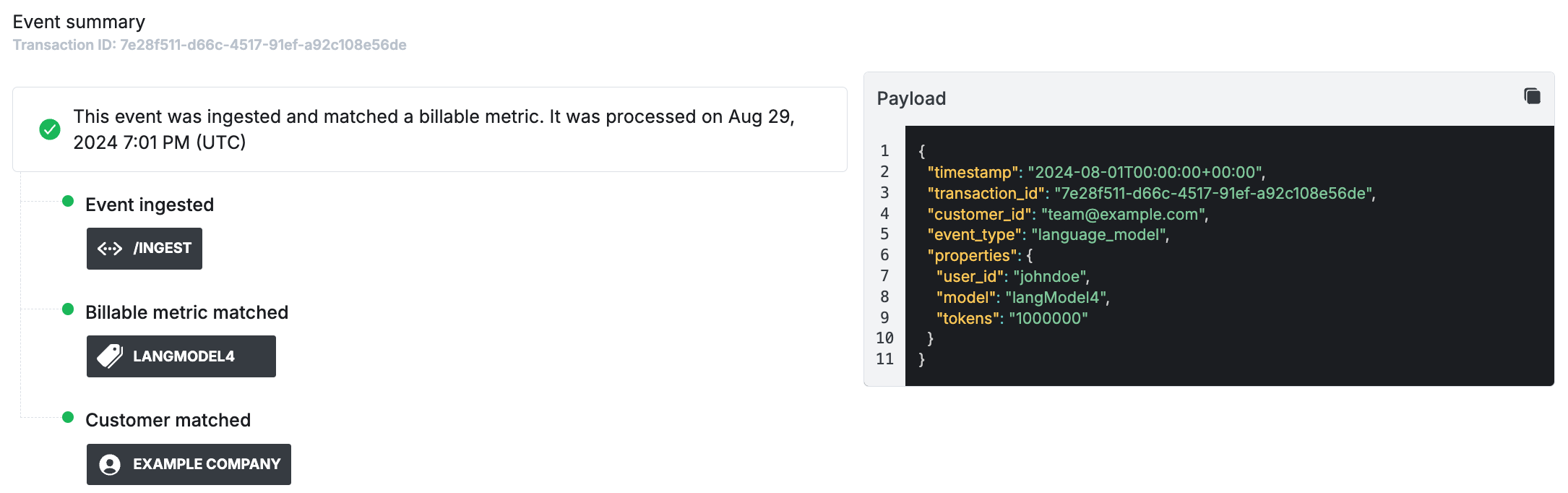
 Note that billable metrics only match usage events sent after the billable metric is created. Now that you created the metric, send in another usage event to ensure that it matches as expected:
```python Python theme={null}
response = client.v1.usage.ingest(
usage=[
{
"transaction_id": "7e28f511-d66c-4517-91ef-a92c108e56de",
"timestamp": "2024-08-01T00:00:00Z",
"customer_id": "team@example.com",
"event_type": "language_model",
"properties": {
"model": "langModel4",
"user_id": "johndoe",
"tokens": 1000000
}
}
]
)
```
```javascript Node theme={null}
await client.V1.usage.ingest([
{
transaction_id: '7e28f511-d66c-4517-91ef-a92c108e56de',
timestamp: "2024-08-01T00:00:00.000Z",
customer_id: 'team@example.com',
event_type: 'language_model',
properties: {
model: "langModel4",
user_id: "johndoe",
tokens: 1000000
}
},
]);
```
```ruby Ruby theme={null}
response = client.v1.usage.ingest(
usage: [
{
transaction_id: "7e28f511-d66c-4517-91ef-a92c108e56de",
timestamp: "2024-08-01T00:00:00Z",
customer_id: "team@example.com",
event_type: "language_model",
properties: {
model: "langModel4",
user_id: "johndoe",
tokens: 1000000
}
}
]
)
```
```go Go theme={null}
err := client.V1.Usage.Ingest(context.TODO(), metronome.UsageIngestParams{
Usage: []metronome.UsageIngestParamsUsage{{
TransactionID: metronome.F("7e28f511-d66c-4517-91ef-a92c108e56de"),
Timestamp: metronome.F("2024-08-01T00:00:00Z"),
CustomerID: metronome.F("team@example.com"),
EventType: metronome.F("language_model"),
Properties: metronome.F(map[string]interface{}{
"model": "langModel4",
"user_id": "johndoe",
"tokens": 1000000,
}),
}},
})
if err != nil {
panic(err.Error())
}
```
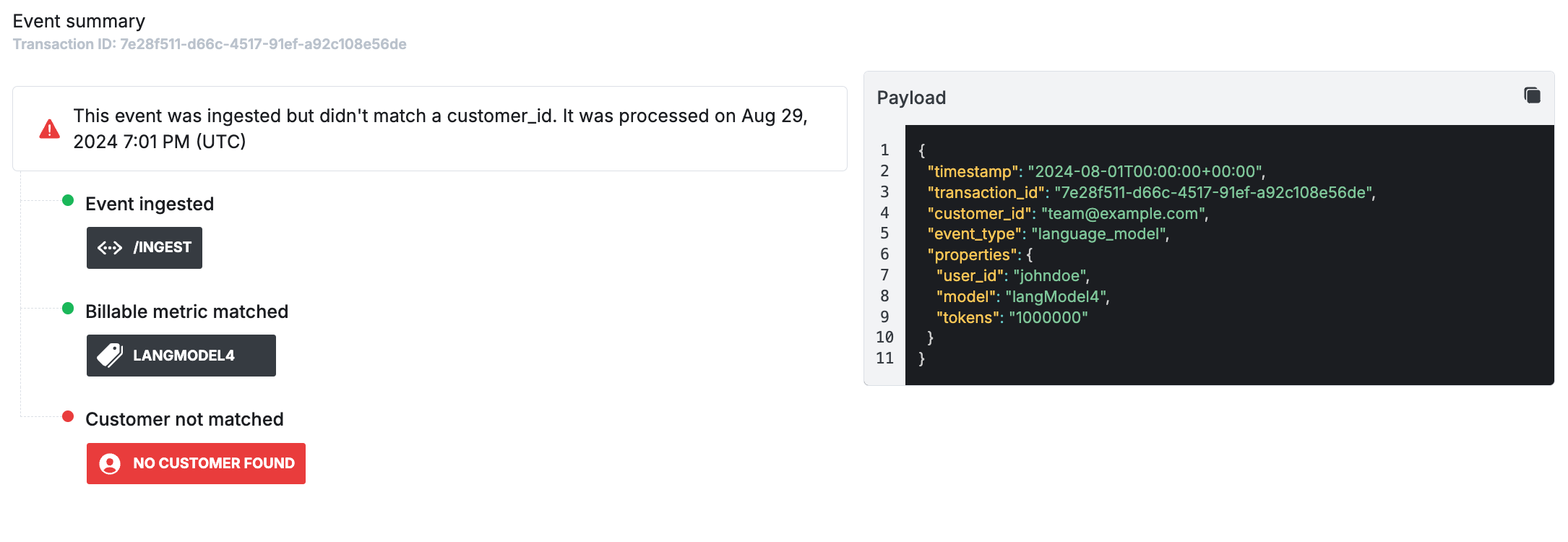
The new usage event matches the defined billable metric.
Note that billable metrics only match usage events sent after the billable metric is created. Now that you created the metric, send in another usage event to ensure that it matches as expected:
```python Python theme={null}
response = client.v1.usage.ingest(
usage=[
{
"transaction_id": "7e28f511-d66c-4517-91ef-a92c108e56de",
"timestamp": "2024-08-01T00:00:00Z",
"customer_id": "team@example.com",
"event_type": "language_model",
"properties": {
"model": "langModel4",
"user_id": "johndoe",
"tokens": 1000000
}
}
]
)
```
```javascript Node theme={null}
await client.V1.usage.ingest([
{
transaction_id: '7e28f511-d66c-4517-91ef-a92c108e56de',
timestamp: "2024-08-01T00:00:00.000Z",
customer_id: 'team@example.com',
event_type: 'language_model',
properties: {
model: "langModel4",
user_id: "johndoe",
tokens: 1000000
}
},
]);
```
```ruby Ruby theme={null}
response = client.v1.usage.ingest(
usage: [
{
transaction_id: "7e28f511-d66c-4517-91ef-a92c108e56de",
timestamp: "2024-08-01T00:00:00Z",
customer_id: "team@example.com",
event_type: "language_model",
properties: {
model: "langModel4",
user_id: "johndoe",
tokens: 1000000
}
}
]
)
```
```go Go theme={null}
err := client.V1.Usage.Ingest(context.TODO(), metronome.UsageIngestParams{
Usage: []metronome.UsageIngestParamsUsage{{
TransactionID: metronome.F("7e28f511-d66c-4517-91ef-a92c108e56de"),
Timestamp: metronome.F("2024-08-01T00:00:00Z"),
CustomerID: metronome.F("team@example.com"),
EventType: metronome.F("language_model"),
Properties: metronome.F(map[string]interface{}{
"model": "langModel4",
"user_id": "johndoe",
"tokens": 1000000,
}),
}},
})
if err != nil {
panic(err.Error())
}
```
The new usage event matches the defined billable metric.
 ## 4. Create a customer
Usage events impact billing for customers, so the next step is to create a customer in Metronome.
Use the SDK to create a customer, similar to this example:
```python Python theme={null}
response = client.v1.customers.create(
name="Example Customer",
ingest_aliases=[
"team@example.com"
]
)
metronome_customer_id = response.data.id
```
```javascript Node theme={null}
const customerResponse = await client.V1.customers.create({
name: "Example Customer",
ingest_aliases: [
"team@example.com"
]
});
const customerId = customerResponse.data.id;
```
```ruby Ruby theme={null}
response = client.v1.customers.create(
name: "Example Customer",
ingest_aliases: [
"team@example.com"
]
)
metronome_customer_id = response.data.id
```
```go Go theme={null}
customerResponse, err := client.V1.Customers.New(context.TODO(), metronome.CustomerNewParams{
Name: metronome.F("Example Customer"),
IngestAliases: metronome.F([]string{
"team@example.com",
}),
})
if err != nil {
panic(err.Error())
}
customerID := customerResponse.Data.ID
```
The properties used in this example include:
* `name`, the display name for the customer in Metronome.
* `ingest_aliases`, a list of identifiers used to match a Metronome customer against a usage event. Ingest aliases are useful if you want to start flowing in usage for customers before they’re created in Metronome. To do this, use the ID from your application’s customer table.
## 4. Create a customer
Usage events impact billing for customers, so the next step is to create a customer in Metronome.
Use the SDK to create a customer, similar to this example:
```python Python theme={null}
response = client.v1.customers.create(
name="Example Customer",
ingest_aliases=[
"team@example.com"
]
)
metronome_customer_id = response.data.id
```
```javascript Node theme={null}
const customerResponse = await client.V1.customers.create({
name: "Example Customer",
ingest_aliases: [
"team@example.com"
]
});
const customerId = customerResponse.data.id;
```
```ruby Ruby theme={null}
response = client.v1.customers.create(
name: "Example Customer",
ingest_aliases: [
"team@example.com"
]
)
metronome_customer_id = response.data.id
```
```go Go theme={null}
customerResponse, err := client.V1.Customers.New(context.TODO(), metronome.CustomerNewParams{
Name: metronome.F("Example Customer"),
IngestAliases: metronome.F([]string{
"team@example.com",
}),
})
if err != nil {
panic(err.Error())
}
customerID := customerResponse.Data.ID
```
The properties used in this example include:
* `name`, the display name for the customer in Metronome.
* `ingest_aliases`, a list of identifiers used to match a Metronome customer against a usage event. Ingest aliases are useful if you want to start flowing in usage for customers before they’re created in Metronome. To do this, use the ID from your application’s customer table.
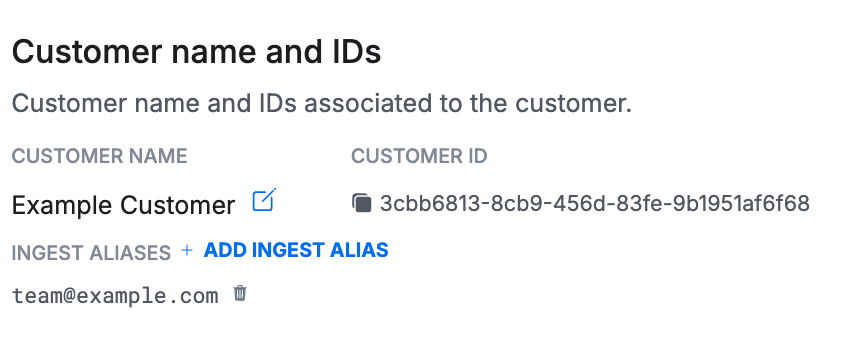 In the example, you associated the newly created customer with the ingest alias `team@example.com`, so the previous event gets matched correctly. After you set the customer up for invoicing in the next section, this event contributes to their current invoice.
 ## 5. Set up pricing and packaging
Next, set up prices and packaging, defined using products and rate cards.
In the example, you want to charge your customer based on their usage of `langModel4` at a rate of \$0.50 per 1 million tokens.
The first step is to create a `product` for your billable metric. A product is where you configure the billable metric for presentation on the eventual invoice. It’s also where you can associate the metric with items in external systems, like the Stripe customer ID. Learn about the configuration options for products in the API docs for the [create product](/api-reference/products/create-a-product) endpoint.
Create a product associated to the billable metric, similar to this example:
```python Python theme={null}
response = client.v1.contracts.products.create(
name="Language Model 4 Tokens (millions)",
type="USAGE",
billable_metric_id=billable_metric_id, # ID from create billable metric response
presentation_group_key=["user_id"],
quantity_conversion={
"conversion_factor": 1000000,
"operation": "divide"
}
)
product_id = response.data.id
```
```javascript Node theme={null}
const productResponse = await client.V1.contracts.products.create({
name: "Language Model 4 Tokens (millions)",
type: "USAGE",
billable_metric_id: billableMetricId, // ID from create billable metric response
presentation_group_key: ["user_id"],
quantity_conversion: {
conversion_factor: 1000000,
operation: "divide"
}
});
const productId = productResponse.data.id;
```
```ruby Ruby theme={null}
response = client.v1.contracts.products.create(
name: "Language Model 4 Tokens (millions)",
type: "USAGE",
billable_metric_id: billable_metric_id, # ID from create billable metric response
presentation_group_key: ["user_id"],
quantity_conversion: {
conversion_factor: 1000000,
operation: "divide"
}
)
product_id = response.data.id
```
```go Go theme={null}
productResponse, err := client.V1.Contracts.Products.New(context.TODO(), metronome.ProductNewParams{
Name: metronome.F("Language Model 4 Tokens (millions)"),
Type: metronome.F(metronome.ProductNewParamsTypeUsage),
BillableMetricID: metronome.F(billableMetricID), // ID from create billable metric response
PresentationGroupKey: metronome.F([]string{
"user_id",
}),
QuantityConversion: metronome.F(metronome.QuantityConversionParam{
ConversionFactor: metronome.F(1000000.0),
Operation: metronome.F(metronome.QuantityConversionParamOperationDivide),
}),
})
if err != nil {
panic(err.Error())
}
productID := productResponse.Data.ID
```
The properties used in this example include:
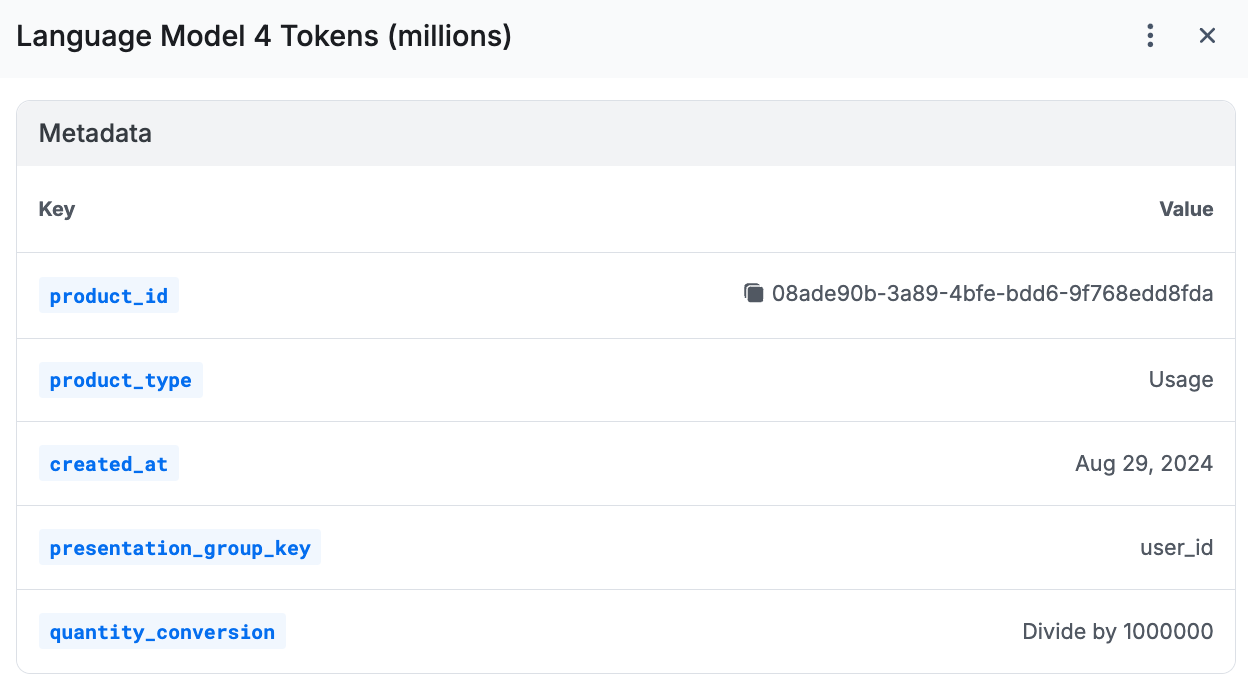
* `name`, the name of the product that appears on the invoice. Often a cleaned presentation of the billable metric name (`Language Model 4 Tokens (millions)` versus `langModel4`).
* `type`, determines how a product gets charged. Supported types include `usage`, `fixed`, `composite` (for percentages of other usage products), and `subscription`.
* `billable_metric_id`, associates the product presentation with an existing billable metric.
* `presentation_group_key`, used to group line items on your invoice by a given property value.
* `quantity_conversion`, used to multiply or divide quantities displayed on the final invoice. For example, charge by million tokens (mTok) while sending in usage at the individual token level.
## 5. Set up pricing and packaging
Next, set up prices and packaging, defined using products and rate cards.
In the example, you want to charge your customer based on their usage of `langModel4` at a rate of \$0.50 per 1 million tokens.
The first step is to create a `product` for your billable metric. A product is where you configure the billable metric for presentation on the eventual invoice. It’s also where you can associate the metric with items in external systems, like the Stripe customer ID. Learn about the configuration options for products in the API docs for the [create product](/api-reference/products/create-a-product) endpoint.
Create a product associated to the billable metric, similar to this example:
```python Python theme={null}
response = client.v1.contracts.products.create(
name="Language Model 4 Tokens (millions)",
type="USAGE",
billable_metric_id=billable_metric_id, # ID from create billable metric response
presentation_group_key=["user_id"],
quantity_conversion={
"conversion_factor": 1000000,
"operation": "divide"
}
)
product_id = response.data.id
```
```javascript Node theme={null}
const productResponse = await client.V1.contracts.products.create({
name: "Language Model 4 Tokens (millions)",
type: "USAGE",
billable_metric_id: billableMetricId, // ID from create billable metric response
presentation_group_key: ["user_id"],
quantity_conversion: {
conversion_factor: 1000000,
operation: "divide"
}
});
const productId = productResponse.data.id;
```
```ruby Ruby theme={null}
response = client.v1.contracts.products.create(
name: "Language Model 4 Tokens (millions)",
type: "USAGE",
billable_metric_id: billable_metric_id, # ID from create billable metric response
presentation_group_key: ["user_id"],
quantity_conversion: {
conversion_factor: 1000000,
operation: "divide"
}
)
product_id = response.data.id
```
```go Go theme={null}
productResponse, err := client.V1.Contracts.Products.New(context.TODO(), metronome.ProductNewParams{
Name: metronome.F("Language Model 4 Tokens (millions)"),
Type: metronome.F(metronome.ProductNewParamsTypeUsage),
BillableMetricID: metronome.F(billableMetricID), // ID from create billable metric response
PresentationGroupKey: metronome.F([]string{
"user_id",
}),
QuantityConversion: metronome.F(metronome.QuantityConversionParam{
ConversionFactor: metronome.F(1000000.0),
Operation: metronome.F(metronome.QuantityConversionParamOperationDivide),
}),
})
if err != nil {
panic(err.Error())
}
productID := productResponse.Data.ID
```
The properties used in this example include:
* `name`, the name of the product that appears on the invoice. Often a cleaned presentation of the billable metric name (`Language Model 4 Tokens (millions)` versus `langModel4`).
* `type`, determines how a product gets charged. Supported types include `usage`, `fixed`, `composite` (for percentages of other usage products), and `subscription`.
* `billable_metric_id`, associates the product presentation with an existing billable metric.
* `presentation_group_key`, used to group line items on your invoice by a given property value.
* `quantity_conversion`, used to multiply or divide quantities displayed on the final invoice. For example, charge by million tokens (mTok) while sending in usage at the individual token level.
 Next, attach a price for the product by adding rates to a rate card.
Build a rate card for your new product, similar to this example:
```python Python theme={null}
response = client.v1.contracts.rate_cards.create(
name="Language Model List Pricing",
description="Prices for all language models.",
)
rate_card_id = response.data.id
response = client.v1.contracts.rate_cards.rates.add(
rate_card_id=rate_card_id,
product_id=product_id,
entitled=True,
rate_type="FLAT",
price=50,
starting_at="2024-01-01T00:00:00.000Z"
)
```
```javascript Node theme={null}
const rateCardResponse = await client.V1.contracts.rateCards.create({
name: "Language Model List Pricing",
description: "Prices for all language models."
});
const rateCardId = rateCardResponse.data.id;
await client.contracts.rateCards.rates.add({
rate_card_id: rateCardId,
product_id: productId,
entitled: true,
rate_type: "FLAT",
price: 50,
starting_at: "2024-01-01T00:00:00.000Z"
});
```
```ruby Ruby theme={null}
response = client.v1.contracts.rate_cards.create(
name: "Language Model List Pricing",
description: "Prices for all language models."
)
rate_card_id = response.data.id
response = client.v1.contracts.rate_cards.rates.add(
rate_card_id: rate_card_id,
product_id: product_id,
entitled: true,
rate_type: "FLAT",
price: 50,
starting_at: "2024-01-01T00:00:00.000Z"
)
```
```go Go theme={null}
rateCardResponse, err := client.V1.Contracts.RateCards.New(context.TODO(), metronome.ContractRateCardNewParams{
Name: metronome.F("Language Model List Pricing"),
Description: metronome.F("Prices for all language models."),
})
if err != nil {
panic(err.Error())
}
rateCardID := rateCardResponse.Data.ID
startingTime, err := time.Parse(time.RFC3339Nano, "2024-01-01T00:00:00.000Z")
if err != nil {
panic(err.Error())
}
_, err = client.V1.Contracts.RateCards.Rates.Add(context.TODO(), metronome.ContractRateCardRateAddParams{
RateCardID: metronome.F(rateCardID),
ProductID: metronome.F(productID),
Entitled: metronome.F(true),
RateType: metronome.F(metronome.ContractRateCardRateAddParamsRateTypeFlat),
Price: metronome.F(50.0),
StartingAt: metronome.F(startingTime),
})
if err != nil {
panic(err.Error())
}
```
The properties used in this example include:
* `entitled`, a boolean that indicates whether a rate shows up by default on a customer’s invoice. If `False`, it won’t appear on a customer’s invoice unless overridden at the contract level.
* `rate_type`, used to configure how a rate gets applied as usage flows in. Supported values include `FLAT` or `TIERED`.
* `price`, the rate itself. For USD, values are in **cents** (for example, `100` = \$1.00). Other currencies use whole units. See [currency denomination](/guides/pricing-packaging/make-pricing-changes/use-currency-custompricingunits#currency-denomination) for details.
* `starting_at`, used to set the time when the rate goes into effect. To evolve your rates over time, set `starting_at` and `ending_before` dates to ensure smooth pricing updates.
You can use this rate card for all SKUs across your product catalog.
## 6. Create a contract
To start generating invoices for a customer, put them on a contract. A contract is an object that represents the terms a customer has agreed to pay, generally based on your rate card. At its most simple, a customer can have a basic contract where they pay the predefined list prices; this may cover many of your simple self-serve cases. If you have specific discounts or commits that a customer negotiated, configure these in the contract on top of the base list prices.
Add your created customer to a contract, similar to this example that uses the Language Model List Pricing rate card:
```python Python theme={null}
response = client.v1.contracts.create(
customer_id=metronome_customer_id,
rate_card_id=rate_card_id,
starting_at="2024-08-01T00:00:00.000Z"
)
```
```javascript Node theme={null}
await client.V1.contracts.create({
customer_id: customerId,
rate_card_id: rateCardId,
starting_at: "2024-08-01T00:00:00.000Z"
});
```
```ruby Ruby theme={null}
response = client.v1.contracts.create(
customer_id: metronome_customer_id,
rate_card_id: rate_card_id,
starting_at: "2024-08-01T00:00:00.000Z"
)
```
```go Go theme={null}
contractStartingTime, err := time.Parse(time.RFC3339Nano, "2024-09-01T00:00:00.000Z")
if err != nil {
panic(err.Error())
}
contractResponse, err := client.V1.Contracts.New(context.TODO(), metronome.ContractNewParams{
CustomerID: metronome.F(customerID),
RateCardID: metronome.F(rateCardID),
StartingAt: metronome.F(contractStartingTime),
})
if err != nil {
panic(err.Error())
}
contractID := contractResponse.Data.ID
```
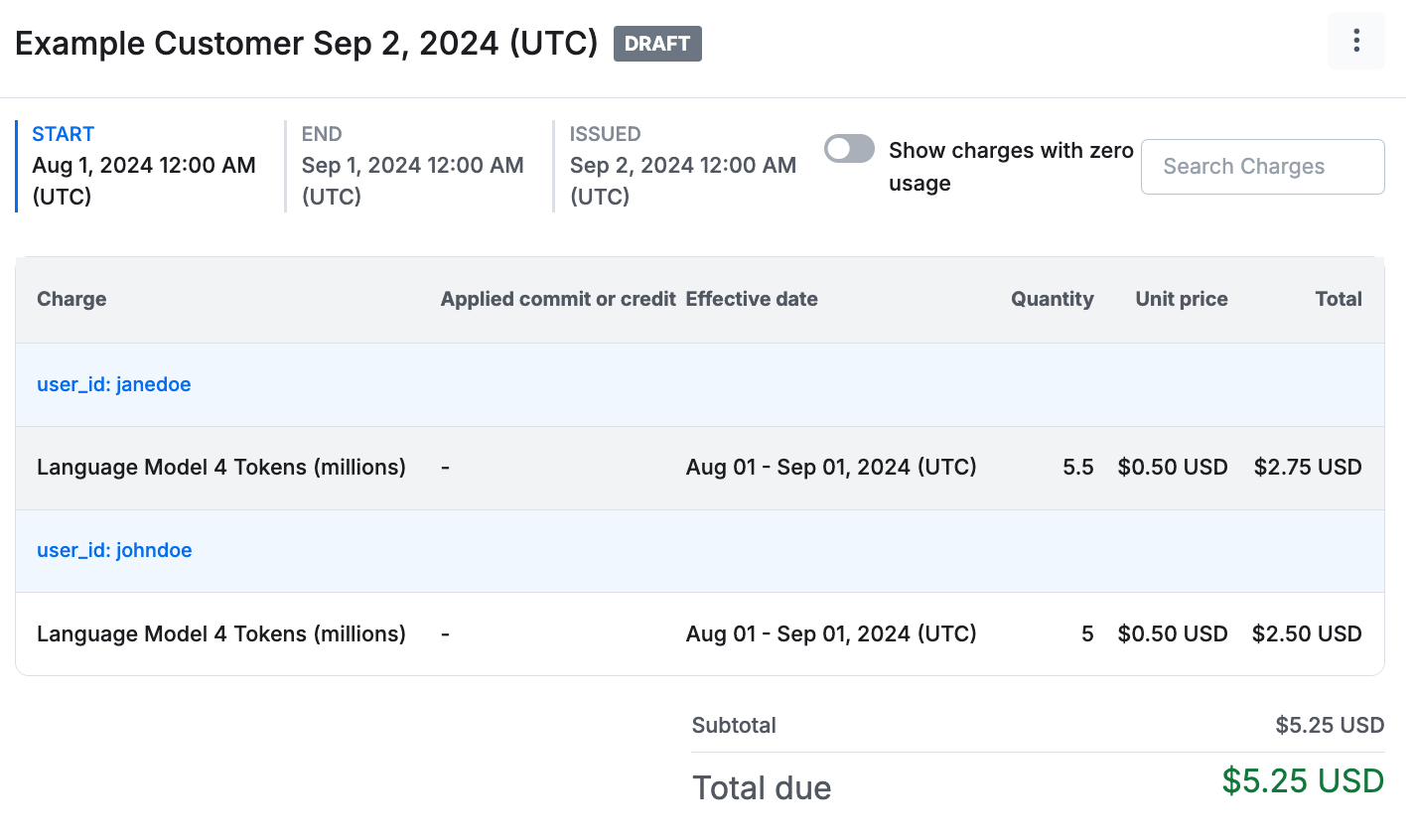
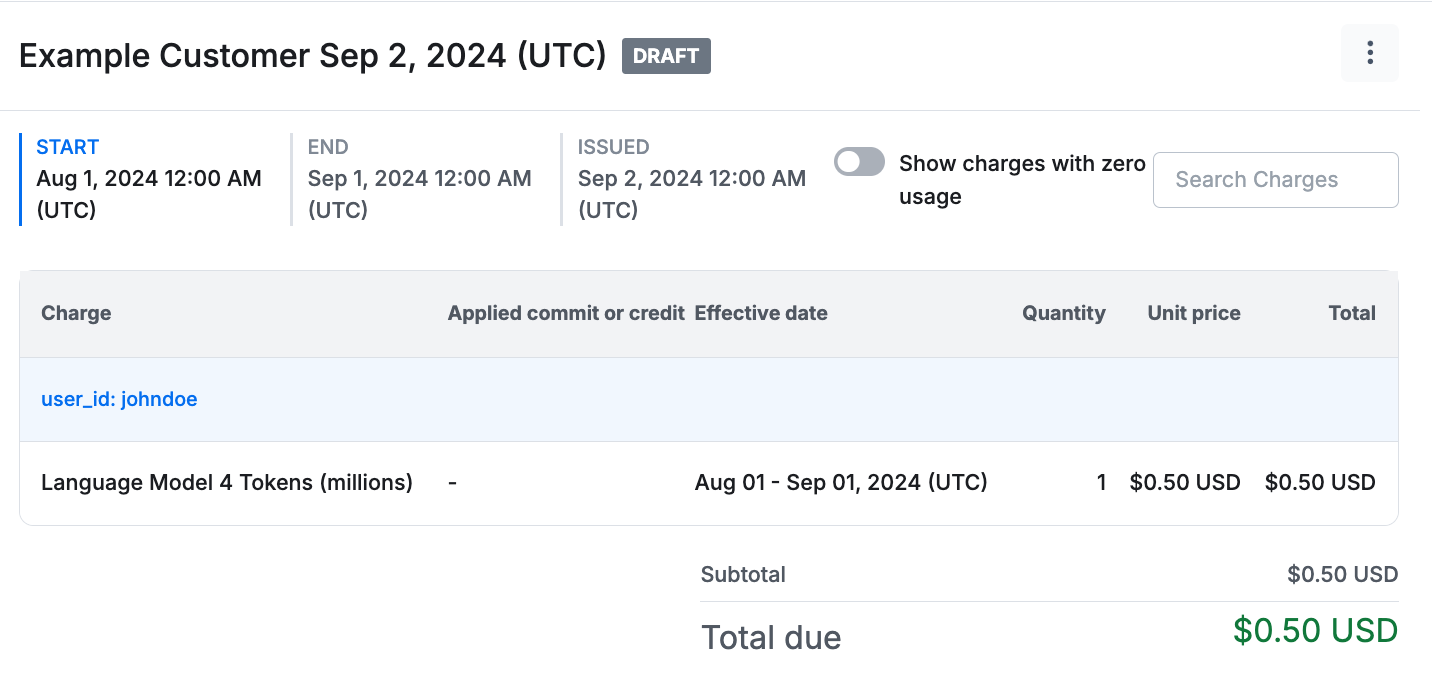
After creating the contract, invoices get generated for all billing periods that occurred after the `starting_at` date. Usage data from the current period is visible to the `DRAFT` invoice. Line items on draft invoices update seconds after Metronome receives usage data.
For the new contract from the example, the previously sent usage of 1 million tokens got applied.
Next, attach a price for the product by adding rates to a rate card.
Build a rate card for your new product, similar to this example:
```python Python theme={null}
response = client.v1.contracts.rate_cards.create(
name="Language Model List Pricing",
description="Prices for all language models.",
)
rate_card_id = response.data.id
response = client.v1.contracts.rate_cards.rates.add(
rate_card_id=rate_card_id,
product_id=product_id,
entitled=True,
rate_type="FLAT",
price=50,
starting_at="2024-01-01T00:00:00.000Z"
)
```
```javascript Node theme={null}
const rateCardResponse = await client.V1.contracts.rateCards.create({
name: "Language Model List Pricing",
description: "Prices for all language models."
});
const rateCardId = rateCardResponse.data.id;
await client.contracts.rateCards.rates.add({
rate_card_id: rateCardId,
product_id: productId,
entitled: true,
rate_type: "FLAT",
price: 50,
starting_at: "2024-01-01T00:00:00.000Z"
});
```
```ruby Ruby theme={null}
response = client.v1.contracts.rate_cards.create(
name: "Language Model List Pricing",
description: "Prices for all language models."
)
rate_card_id = response.data.id
response = client.v1.contracts.rate_cards.rates.add(
rate_card_id: rate_card_id,
product_id: product_id,
entitled: true,
rate_type: "FLAT",
price: 50,
starting_at: "2024-01-01T00:00:00.000Z"
)
```
```go Go theme={null}
rateCardResponse, err := client.V1.Contracts.RateCards.New(context.TODO(), metronome.ContractRateCardNewParams{
Name: metronome.F("Language Model List Pricing"),
Description: metronome.F("Prices for all language models."),
})
if err != nil {
panic(err.Error())
}
rateCardID := rateCardResponse.Data.ID
startingTime, err := time.Parse(time.RFC3339Nano, "2024-01-01T00:00:00.000Z")
if err != nil {
panic(err.Error())
}
_, err = client.V1.Contracts.RateCards.Rates.Add(context.TODO(), metronome.ContractRateCardRateAddParams{
RateCardID: metronome.F(rateCardID),
ProductID: metronome.F(productID),
Entitled: metronome.F(true),
RateType: metronome.F(metronome.ContractRateCardRateAddParamsRateTypeFlat),
Price: metronome.F(50.0),
StartingAt: metronome.F(startingTime),
})
if err != nil {
panic(err.Error())
}
```
The properties used in this example include:
* `entitled`, a boolean that indicates whether a rate shows up by default on a customer’s invoice. If `False`, it won’t appear on a customer’s invoice unless overridden at the contract level.
* `rate_type`, used to configure how a rate gets applied as usage flows in. Supported values include `FLAT` or `TIERED`.
* `price`, the rate itself. For USD, values are in **cents** (for example, `100` = \$1.00). Other currencies use whole units. See [currency denomination](/guides/pricing-packaging/make-pricing-changes/use-currency-custompricingunits#currency-denomination) for details.
* `starting_at`, used to set the time when the rate goes into effect. To evolve your rates over time, set `starting_at` and `ending_before` dates to ensure smooth pricing updates.
You can use this rate card for all SKUs across your product catalog.
## 6. Create a contract
To start generating invoices for a customer, put them on a contract. A contract is an object that represents the terms a customer has agreed to pay, generally based on your rate card. At its most simple, a customer can have a basic contract where they pay the predefined list prices; this may cover many of your simple self-serve cases. If you have specific discounts or commits that a customer negotiated, configure these in the contract on top of the base list prices.
Add your created customer to a contract, similar to this example that uses the Language Model List Pricing rate card:
```python Python theme={null}
response = client.v1.contracts.create(
customer_id=metronome_customer_id,
rate_card_id=rate_card_id,
starting_at="2024-08-01T00:00:00.000Z"
)
```
```javascript Node theme={null}
await client.V1.contracts.create({
customer_id: customerId,
rate_card_id: rateCardId,
starting_at: "2024-08-01T00:00:00.000Z"
});
```
```ruby Ruby theme={null}
response = client.v1.contracts.create(
customer_id: metronome_customer_id,
rate_card_id: rate_card_id,
starting_at: "2024-08-01T00:00:00.000Z"
)
```
```go Go theme={null}
contractStartingTime, err := time.Parse(time.RFC3339Nano, "2024-09-01T00:00:00.000Z")
if err != nil {
panic(err.Error())
}
contractResponse, err := client.V1.Contracts.New(context.TODO(), metronome.ContractNewParams{
CustomerID: metronome.F(customerID),
RateCardID: metronome.F(rateCardID),
StartingAt: metronome.F(contractStartingTime),
})
if err != nil {
panic(err.Error())
}
contractID := contractResponse.Data.ID
```
After creating the contract, invoices get generated for all billing periods that occurred after the `starting_at` date. Usage data from the current period is visible to the `DRAFT` invoice. Line items on draft invoices update seconds after Metronome receives usage data.
For the new contract from the example, the previously sent usage of 1 million tokens got applied.
 Next, send in a few more usage events and see it update in real time:
```python Python theme={null}
response = client.v1.usage.ingest(
usage=[
{
"transaction_id": "382a3069-d056-4249-824d-d288b51d7743",
"timestamp": "2024-08-15T04:39:20Z",
"customer_id": "team@example.com",
"event_type": "language_model",
"properties": {
"model": "langModel4",
"user_id": "johndoe",
"tokens": 1000000
}
},
{
"transaction_id": "db64bf17-f13d-4c19-89cc-acaf878a42c6",
"timestamp": "2024-08-16T19:11:02Z",
"customer_id": "team@example.com",
"event_type": "language_model",
"properties": {
"model": "langModel4",
"user_id": "janedoe",
"tokens": 5500000
}
},
{
"transaction_id": "266339fd-2125-4827-afb7-a395a7f0007f",
"timestamp": "2024-08-17T12:51:32Z",
"customer_id": "team@example.com",
"event_type": "language_model",
"properties": {
"model": "langModel4",
"user_id": "johndoe",
"tokens": 3000000
}
},
]
)
```
```javascript Node theme={null}
await client.V1.usage.ingest([
{
transaction_id: '382a3069-d056-4249-824d-d288b51d7743',
timestamp: "2024-08-15T04:39:20Z",
customer_id: 'team@example.com',
event_type: 'language_model',
properties: {
model: "langModel4",
user_id: "johndoe",
tokens: 1000000
}
},
{
transaction_id: 'db64bf17-f13d-4c19-89cc-acaf878a42c6',
timestamp: "2024-08-16T19:11:02Z",
customer_id: 'team@example.com',
event_type: 'language_model',
properties: {
model: "langModel4",
user_id: "janedoe",
tokens: 5500000
}
},
{
transaction_id: '266339fd-2125-4827-afb7-a395a7f0007f',
timestamp: "2024-08-17T12:51:32Z",
customer_id: 'team@example.com',
event_type: 'language_model',
properties: {
model: "langModel4",
user_id: "johndoe",
tokens: 3000000
}
},
]);
```
```ruby Ruby theme={null}
response = client.v1.usage.ingest(
usage: [
{
transaction_id: "382a3069-d056-4249-824d-d288b51d7743",
timestamp: "2024-08-15T04:39:20Z",
customer_id: "team@example.com",
event_type: "language_model",
properties: {
model: "langModel4",
user_id: "johndoe",
tokens: 1000000
}
},
{
transaction_id: "db64bf17-f13d-4c19-89cc-acaf878a42c6",
timestamp: "2024-08-16T19:11:02Z",
customer_id: "team@example.com",
event_type: "language_model",
properties: {
model: "langModel4",
user_id: "janedoe",
tokens: 5500000
}
},
{
transaction_id: "266339fd-2125-4827-afb7-a395a7f0007f",
timestamp: "2024-08-17T12:51:32Z",
customer_id: "team@example.com",
event_type: "language_model",
properties: {
model: "langModel4",
user_id: "johndoe",
tokens: 3000000
}
}
]
)
```
```go Go theme={null}
err := client.V1.Usage.Ingest(context.TODO(), metronome.UsageIngestParams{
Usage: []metronome.UsageIngestParamsUsage{
{
TransactionID: metronome.F("382a3069-d056-4249-824d-d288b51d7743"),
Timestamp: metronome.F("2024-08-15T04:39:20Z"),
CustomerID: metronome.F("team@example.com"),
EventType: metronome.F("language_model"),
Properties: metronome.F(map[string]interface{}{
"model": "langModel4",
"user_id": "johndoe",
"tokens": 1000000,
}),
},
{
TransactionID: metronome.F("db64bf17-f13d-4c19-89cc-acaf878a42c6"),
Timestamp: metronome.F("2024-08-16T19:11:02Z"),
CustomerID: metronome.F("team@example.com"),
EventType: metronome.F("language_model"),
Properties: metronome.F(map[string]interface{}{
"model": "langModel4",
"user_id": "janedoe",
"tokens": 5500000,
}),
},
{
TransactionID: metronome.F("266339fd-2125-4827-afb7-a395a7f0007f"),
Timestamp: metronome.F("2024-08-17T12:51:32Z"),
CustomerID: metronome.F("team@example.com"),
EventType: metronome.F("language_model"),
Properties: metronome.F(map[string]interface{}{
"model": "langModel4",
"user_id": "johndoe",
"tokens": 3000000,
}),
},
},
})
if err != nil {
panic(err.Error())
}
```
After refreshing the invoice, the values from the three event payloads above applies to the running line item totals. The group keys previously applied let you separate out the invoice presentation by the user ID associated with the usage.
Next, send in a few more usage events and see it update in real time:
```python Python theme={null}
response = client.v1.usage.ingest(
usage=[
{
"transaction_id": "382a3069-d056-4249-824d-d288b51d7743",
"timestamp": "2024-08-15T04:39:20Z",
"customer_id": "team@example.com",
"event_type": "language_model",
"properties": {
"model": "langModel4",
"user_id": "johndoe",
"tokens": 1000000
}
},
{
"transaction_id": "db64bf17-f13d-4c19-89cc-acaf878a42c6",
"timestamp": "2024-08-16T19:11:02Z",
"customer_id": "team@example.com",
"event_type": "language_model",
"properties": {
"model": "langModel4",
"user_id": "janedoe",
"tokens": 5500000
}
},
{
"transaction_id": "266339fd-2125-4827-afb7-a395a7f0007f",
"timestamp": "2024-08-17T12:51:32Z",
"customer_id": "team@example.com",
"event_type": "language_model",
"properties": {
"model": "langModel4",
"user_id": "johndoe",
"tokens": 3000000
}
},
]
)
```
```javascript Node theme={null}
await client.V1.usage.ingest([
{
transaction_id: '382a3069-d056-4249-824d-d288b51d7743',
timestamp: "2024-08-15T04:39:20Z",
customer_id: 'team@example.com',
event_type: 'language_model',
properties: {
model: "langModel4",
user_id: "johndoe",
tokens: 1000000
}
},
{
transaction_id: 'db64bf17-f13d-4c19-89cc-acaf878a42c6',
timestamp: "2024-08-16T19:11:02Z",
customer_id: 'team@example.com',
event_type: 'language_model',
properties: {
model: "langModel4",
user_id: "janedoe",
tokens: 5500000
}
},
{
transaction_id: '266339fd-2125-4827-afb7-a395a7f0007f',
timestamp: "2024-08-17T12:51:32Z",
customer_id: 'team@example.com',
event_type: 'language_model',
properties: {
model: "langModel4",
user_id: "johndoe",
tokens: 3000000
}
},
]);
```
```ruby Ruby theme={null}
response = client.v1.usage.ingest(
usage: [
{
transaction_id: "382a3069-d056-4249-824d-d288b51d7743",
timestamp: "2024-08-15T04:39:20Z",
customer_id: "team@example.com",
event_type: "language_model",
properties: {
model: "langModel4",
user_id: "johndoe",
tokens: 1000000
}
},
{
transaction_id: "db64bf17-f13d-4c19-89cc-acaf878a42c6",
timestamp: "2024-08-16T19:11:02Z",
customer_id: "team@example.com",
event_type: "language_model",
properties: {
model: "langModel4",
user_id: "janedoe",
tokens: 5500000
}
},
{
transaction_id: "266339fd-2125-4827-afb7-a395a7f0007f",
timestamp: "2024-08-17T12:51:32Z",
customer_id: "team@example.com",
event_type: "language_model",
properties: {
model: "langModel4",
user_id: "johndoe",
tokens: 3000000
}
}
]
)
```
```go Go theme={null}
err := client.V1.Usage.Ingest(context.TODO(), metronome.UsageIngestParams{
Usage: []metronome.UsageIngestParamsUsage{
{
TransactionID: metronome.F("382a3069-d056-4249-824d-d288b51d7743"),
Timestamp: metronome.F("2024-08-15T04:39:20Z"),
CustomerID: metronome.F("team@example.com"),
EventType: metronome.F("language_model"),
Properties: metronome.F(map[string]interface{}{
"model": "langModel4",
"user_id": "johndoe",
"tokens": 1000000,
}),
},
{
TransactionID: metronome.F("db64bf17-f13d-4c19-89cc-acaf878a42c6"),
Timestamp: metronome.F("2024-08-16T19:11:02Z"),
CustomerID: metronome.F("team@example.com"),
EventType: metronome.F("language_model"),
Properties: metronome.F(map[string]interface{}{
"model": "langModel4",
"user_id": "janedoe",
"tokens": 5500000,
}),
},
{
TransactionID: metronome.F("266339fd-2125-4827-afb7-a395a7f0007f"),
Timestamp: metronome.F("2024-08-17T12:51:32Z"),
CustomerID: metronome.F("team@example.com"),
EventType: metronome.F("language_model"),
Properties: metronome.F(map[string]interface{}{
"model": "langModel4",
"user_id": "johndoe",
"tokens": 3000000,
}),
},
},
})
if err != nil {
panic(err.Error())
}
```
After refreshing the invoice, the values from the three event payloads above applies to the running line item totals. The group keys previously applied let you separate out the invoice presentation by the user ID associated with the usage.