> ## Documentation Index
> Fetch the complete documentation index at: https://docs.metronome.com/llms.txt
> Use this file to discover all available pages before exploring further.
# API quickstart
> Get to your first invoice with the Metronome API
This guide walks you through Metronome's API to set up billing programmatically — from creating your first billable metric to seeing a working invoice.
**Looking for the UI guide?** If you prefer configuring billing through the Metronome dashboard, see the [UI Quickstart](/guides/get-started/metronome-dashboard-quickstart).
## Prerequisites
* A Metronome sandbox account ([sign up here](https://signup.metronome.com/))
* Your Metronome sandbox API token (**Connections → API Tokens & webhooks** in the dashboard)
### Environments & authentication
The environment is determined entirely by your API token. A sandbox token only works with sandbox data; a production token only works with production data. All requests require a Bearer token.
## Step 1: Understand how the pieces fit together
Before building anything, here's how Metronome's core objects connect:
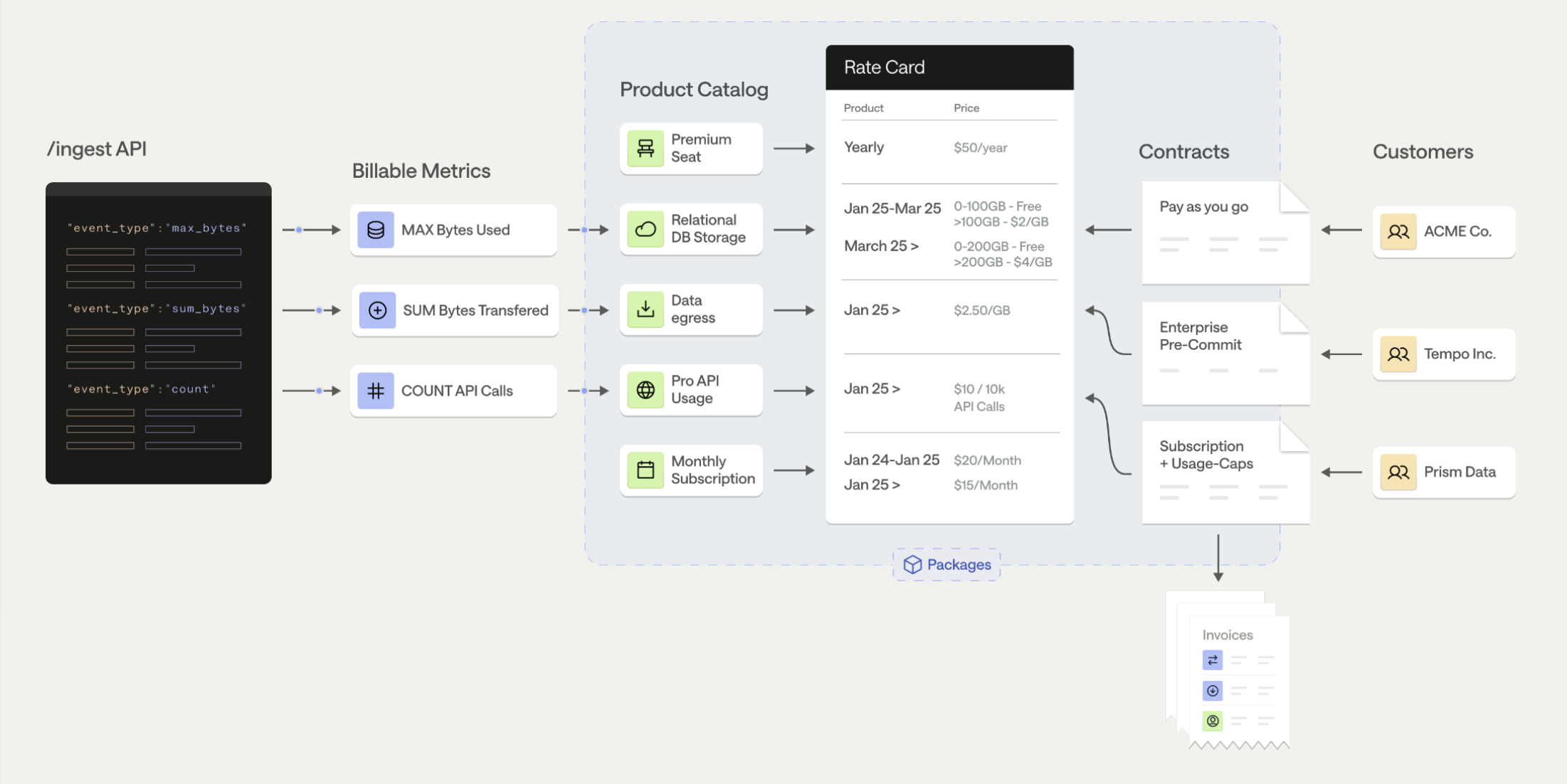 Metronome separates *metering* (what you measure) from *rating* (what you charge). You can change pricing without changing your event instrumentation, and vice versa.
Here's what each object does:
* **Usage Events** — Raw records of customer activity sent to Metronome (e.g., "customer X used 1,500 input tokens on model gpt-5 at timestamp Z")
* **Billable Metrics** — Rules that aggregate your events into billable quantities (e.g., "sum the `input_tokens` property for events of type `llm_request`"). This is also where you define **group keys** — the properties you'll use to price by or display on invoices.
* **Products** — Named line items on an invoice.
* **Rate Cards** — A centralized price book assigning a price to each product. A single rate card can be shared across many customers, making pricing updates easy to roll out.
* **Contracts** — Customer-specific agreements referencing a rate card, defining the billing period, and optionally including credits, commits, or overrides.
* **Packages** — Encodes your rate card and contract details in a single package to be applied across new customers.
* **Invoices** — Automatically generated each billing period based on a customer’s recurring charges and usage, rated against the contract.
**What you need to create (in this order):**
1. A billable metric
2. A product
3. A rate card with rates for each product
4. A customer
5. A contract linking the customer to the rate card
Then you send events and Metronome handles the rest.
## Step 2: Design your event schema
Before creating anything, decide what your usage events look like. Every event sent to Metronome has this structure:
```json theme={null}
{
"transaction_id": "2026-03-09T14:30:00Z_req_abc123",
"customer_id": "your-customer-uuid-in-metronome",
"event_type": "llm_request",
"timestamp": "2026-03-09T14:30:00Z",
"properties": {
"model": "gpt-5",
"input_tokens": "1500",
"output_tokens": "350",
"provider": "openai",
"region": "us-east-1",
"user_id": "user_8f3a",
"cost": "0.0042"
}
}
```
### Required fields
* **`transaction_id`** — Unique per event for idempotency. If the same `transaction_id` is sent twice, Metronome deduplicates. Tip: combine timestamp + request ID.
* **`customer_id`** — Metronome customer UUID, or an `ingest_alias` configured on the customer (so you can use your own internal ID).
* **`event_type`** — String connecting this event to a billable metric. Must exactly match the billable metric's `event_type_filter` `in_values`.
* **`timestamp`** — ISO 8601 format. Must be within the last **34 days** (Metronome's backdating window). Future-dated events are rejected.
### Properties (metric-dependent)
* **`properties`** — Key-value pairs. **All values should be strings** (even numbers) — Metronome uses arbitrary-precision decimals internally to avoid floating point issues. Metronome also supports up to **2,000 properties** per event.
Properties serve three purposes:
1. **Aggregation** — The value you sum, count, or max (e.g., `input_tokens`, `duration_seconds`)
2. **Group keys** — Dimensions for pricing (e.g., `model`, `region`) or invoice display (e.g., `user_id`, `project_id`). **Must be defined on the billable metric first.**
3. **Metadata** — Context for customers, COGS analysis, or future-proofing (e.g., `provider`, `cost`, `endpoint`)
**Send more properties than you think you need.** You can always ignore unused properties, but you cannot retroactively add group keys to a billable metric.
### Common event patterns
| Use Case | `event_type` | Key Properties |
| -------------- | ------------------ | ----------------------------------------------------------------------- |
| AI/LLM API | `llm_request` | `model`, `input_tokens`, `output_tokens`, `provider`, `user_id`, `cost` |
| Generic API | `api_call` | `endpoint`, `method`, `response_code`, `user_id` |
| Compute | `compute_usage` | `instance_type`, `duration_seconds`, `region`, `user_id` |
| Storage | `storage_snapshot` | `storage_gb`, `tier`, `user_id` |
| Seats/Licenses | `active_seat` | `user_id`, `role`, `plan` |
For more patterns, see [Event Design Patterns](/guides/events/design-usage-events).
## Step 3: Create a billable metric
API Reference: [Create a Billable Metric](/api-reference/billable-metrics/create-a-billable-metric)
### Example — Count API calls (simple):
```bash theme={null}
curl -X POST https://api.metronome.com/v1/billable-metrics/create \
-H "Authorization: Bearer $METRONOME_API_TOKEN" \
-H "Content-Type: application/json" \
-d '{
"name": "API Calls",
"aggregation_type": "count",
"event_type_filter": {
"in_values": ["api_call"]
}
}'
```
### Example — Sum tokens with group keys:
```bash theme={null}
curl -X POST https://api.metronome.com/v1/billable-metrics/create \
-H "Authorization: Bearer $METRONOME_API_TOKEN" \
-H "Content-Type: application/json" \
-d '{
"name": "Input Tokens",
"aggregation_type": "sum",
"aggregation_key": "input_tokens",
"event_type_filter": {
"in_values": ["llm_request"]
},
"property_filters": [
{ "name": "model", "exists": true },
{ "name": "input_tokens", "exists": true },
{ "name": "user_id", "exists": true }
],
"group_keys": [["model"], ["user_id"]]
}'
```
### Aggregation types
`count` | `sum` | `unique` | `max` | `latest`
* **`count`** — Number of matching events (API calls, requests)
* **`sum`** — Sum of a numeric property (tokens, bytes, seconds)
* **`max`** — Maximum value in a window (peak storage, concurrent connections)
### Group keys
Group keys determine what you price by and display on invoices. They work like `GROUP BY` in SQL. **Define them here — they can't be added later.**
For streaming BMs, properties used as group keys must appear in `property_filters` with `"exists": true`.
| Group key | Downstream use | Example |
| --------------- | ---------------------- | ------------------------------ |
| `model` | Pricing group key | Different price per AI model |
| `region` | Pricing group key | Different price per region |
| `instance_type` | Pricing group key | Different price per GPU |
| `user_id` | Presentation group key | Per-user invoice breakdowns |
| `project_id` | Presentation group key | Per-project invoice breakdowns |
### SQL billable metrics
For complex calculations (daily averages, percentile-based billing, weighted formulas), use SQL billable metrics. Any column returned by your SQL query besides `value` can be used as a group key. [Learn more →](/guides/get-started/core-concepts/billable-metrics-sql-editor)
**Billable metrics are immutable after creation**
You cannot add or change group keys, property filters, or aggregation settings. Include group keys for any dimension you might price by or display in the future.
Example — unique users per region:
```sql theme={null}
SELECT count(DISTINCT properties.user_id) as value,
properties.region
FROM events
WHERE event_type = 'api_request'
GROUP BY properties.region
```
Here, `region` is returned as a column and can be used as a pricing group key on the product.
## Step 4: Create a product
API Reference: [Create a Product](/api-reference/products/create-a-product)
### Example — Usage product with group keys:
```bash theme={null}
curl -X POST https://api.metronome.com/v1/contract-pricing/products/create \
-H "Authorization: Bearer $METRONOME_API_TOKEN" \
-H "Content-Type: application/json" \
-d '{
"name": "Input Tokens",
"type": "usage",
"billable_metric_id": "",
"pricing_group_key": ["model"],
"presentation_group_key": ["user_id"]
}'
```
### Product types
* **`usage`** — Variably priced based on customer usage (requires a billable metric)
* **`subscription`** — Recurring fee on a schedule (platform fees, seat licenses)
* **`composite`** — Percentage charge on a usage product
* **`fixed`** — One-time or scheduled charges (commits, credits, one-time fees)
### Group key assignment
| I want to... | Field | Notes |
| ---------------------------------------- | ------------------------ | --------------------------------------------------- |
| Different prices per dimension value | `pricing_group_key` | Each value gets its own rate entry on the rate card |
| Invoice line-item breakdowns (same rate) | `presentation_group_key` | Groups line items by this dimension |
| One flat price | Don't set either | Simple billing |
Group keys on the product must be a subset of group keys on the underlying billable metric.
*(Optional Conversions)* Add a **quantity conversion** — e.g., send individual tokens but display and price per million tokens on the invoice. Add a **rounding conversion** — e.g., send seconds but round and display to the nearest minute on the invoice.
## Step 5: Create a rate card
API Reference: [Create a Rate Card](/api-reference/rate-cards/create-a-rate-card)
**Best practice:** Use a centralized rate card shared across customers. Rate updates propagate to all referencing contracts.
### Create the rate card:
```bash theme={null}
curl -X POST https://api.metronome.com/v1/contract-pricing/rate-cards/create \
-H "Authorization: Bearer $METRONOME_API_TOKEN" \
-H "Content-Type: application/json" \
-d '{"name": "Standard Pricing"}'
```
### Add Rates:
```bash theme={null}
curl --request POST \
--url https://api.metronome.com/v1/contract-pricing/rate-cards/addRates \
--header 'Authorization: Bearer $METRONOME_API_TOKEN' \
--header 'Content-Type: application/json' \
--data '
{
"rate_card_id": "d7abd0cd-4ae9-4db7-8676-e986a4ebd8dc",
"rates": [
{
"product_id": "13117714-3f05-48e5-a6e9-a66093f13b4d",
"starting_at": "2020-01-01T00:00:00.000Z",
"entitled": true,
"rate_type": "FLAT",
"price": 100,
"pricing_group_values": {
"region": "us-west-2",
"cloud": "aws"
}
},
{
"product_id": "13117714-3f05-48e5-a6e9-a66093f13b4d",
"starting_at": "2020-01-01T00:00:00.000Z",
"entitled": true,
"rate_type": "FLAT",
"price": 120,
"pricing_group_values": {
"region": "us-east-2",
"cloud": "aws"
}
}
]
}
'
```
### Add dimensional pricing (one entry per value):
```bash theme={null}
curl -X POST https://api.metronome.com/v1/contract-pricing/rate-cards/rates/add \
-H "Authorization: Bearer $METRONOME_API_TOKEN" \
-H "Content-Type: application/json" \
-d '{
"rate_card_id": "",
"product_id": "",
"starting_at": "2026-03-01T00:00:00Z",
"rate_type": "flat",
"price": 1.50,
"entitled": true,
"pricing_group_values": {
"model": "gpt-5"
}
}'
```
Repeat with different `pricing_group_values` for each dimension value (e.g., `gpt-5-mini` at \$0.30).
### Additional capabilities
* **Tiered pricing** — Volume-based tiers via the `tiers` field on a rate entry
* **Custom Pricing Units** — Create under **Offering → Pricing Units** in the UI, then reference the `credit_type_id` on the rate card for credit-based billing. [Learn more →](/guides/pricing-packaging/make-pricing-changes/use-currency-custompricingunits)
* **Commit rates** — Rates that apply specifically to prepaid commit drawdown
## Step 6: Create a customer and contract
### Create a customer:
API Reference: [Create a Customer](/api-reference/customers/create-a-customer)
```bash theme={null}
curl -X POST https://api.metronome.com/v1/customers/create \
-H "Authorization: Bearer $METRONOME_API_TOKEN" \
-H "Content-Type: application/json" \
-d '{
"name": "Test Customer",
"ingest_aliases": ["my-internal-customer-id"]
}'
```
The `ingest_aliases` field lets you send events keyed on your own internal customer identifier instead of Metronome's UUID. You can map sub-organizations to a single customer using multiple aliases.
### Create a contract:
API Reference: [Create a Contract](/api-reference/contracts/create-a-contract)
```bash theme={null}
curl -X POST https://api.metronome.com/v1/contracts/create \
-H "Authorization: Bearer $METRONOME_API_TOKEN" \
-H "Content-Type: application/json" \
-d '{
"customer_id": "",
"rate_card_id": "",
"starting_at": "2026-03-01T00:00:00Z",
"usage_statement_schedule": {
"frequency": "MONTHLY"
}
}'
```
This creates a contract **without a billing provider** — invoices will be generated in Metronome and viewable in the dashboard. To have invoices automatically sent to Stripe, add `billing_provider_configuration`:
```json theme={null}
"billing_provider_configuration": {
"billing_provider": "stripe",
"delivery_method": "direct_to_billing_provider"
}
```
For full Stripe setup (account-level connection, customer billing config, etc.), see the [Stripe Integration Guide](/integrations/invoice-integrations/stripe).
## Step 7: Send your first events
API Reference: [Ingest Events](/api-reference/usage/ingest-events)
Batch up to **100 events** per request. Metronome supports approximately **6.6 million events per minute** with batching.
```bash theme={null}
curl -X POST https://api.metronome.com/v1/ingest \
-H "Authorization: Bearer $METRONOME_API_TOKEN" \
-H "Content-Type: application/json" \
-d '[{
"transaction_id": "test-001",
"customer_id": "",
"event_type": "llm_request",
"timestamp": "2026-03-09T12:00:00Z",
"properties": {
"model": "gpt-5",
"input_tokens": "1500",
"user_id": "user_1"
}
},
{
"transaction_id": "test-002",
"customer_id": "",
"event_type": "llm_request",
"timestamp": "2026-03-09T12:01:00Z",
"properties": {
"model": "gpt-5-mini",
"input_tokens": "800",
"user_id": "user_2"
}
}]'
```
### Important behaviors
* A **`200` response** means events were accepted for ingestion. Check the response body for per-event errors.
* Note that if there's no matching BM for the `event_type` or required properties are not included, events are stored but may not appear in usage calculations. Be sure to create billable metrics before sending events if they are needed for rating.
* Events can be **backdated up to 34 days**. Events with future timestamps are rejected.
* **`transaction_id`** is used for deduplication. Sending the same ID twice won't double-bill.
* **Only ingest endpoint events are metered.** API calls for managing customers, contracts, etc. are not billable.
### Verify your events
Navigate to **Connections → Events** in the dashboard. Search by `transaction_id`. Click into an individual event to see if it matched a billable metric and customer — this is the fastest diagnostic.
Refresh the page if events don't appear immediately. The aggregate "Total event count" may lag.
### Troubleshooting
1. **Click into the event** on the Events page — verify it matched a BM and customer.
2. **Check the API response** from your ingest call for per-event errors.
3. If events match a BM + customer **but don't appear on the invoice:** The pricing group key values in the event likely don't match any rate on the rate card. For example, `"model": "gpt-5"` vs `"model": "gpt5"` (missing hyphen) will silently fail to rate.
4. **Verify your API token** is for sandbox (not production, or vice versa).
## Step 8: Verify your invoice
Navigate to **Customers → \[Your Customer] → Invoices** in the dashboard. The draft invoice should show your usage and charges.
**Invoice lifecycle:**
1. **Draft** — Accumulates usage throughout the billing period (viewable in Metronome)
2. **Finalized** — Locked at end of billing period. There is a **24 hour grace period** at the end of the billing period before invoices are finalized to make any necessary changes to an invoice.
3. **Sent to billing provider** — If Stripe is connected, pushed within \~1 hour of finalization. Payment status managed in Stripe's dashboard.
4. **Paid / Failed** — Collection handled by your billing provider
Verify the draft invoice shows correct usage quantities and charges based on your event ingestion and rate card pricing. If you see usage (under Connections) but no charges on the invoice, check that your events are matching the pricing group key values on your rate card.
## Ready for more?
* [**Embeddable Customer Dashboards**](/guides/customers-billing/optimize-customer-experience/customer-dashboards-and-reporting) — Self-serve usage visibility for your customers
* [**Webhooks**](/guides/platform-configuration/setup-webhooks) — Invoice lifecycle, balance alerts, payment events
* [**Alerts & Notifications**](/guides/customers-billing/set-up-notifications/create-and-manage-notifications) — Spend thresholds, balance notifications
* [**Credits & Commits**](/guides/pricing-packaging/apply-credits-and-commits) — Prepaid balances, enterprise commitments
* [**Stripe Integration**](/integrations/invoice-integrations/stripe) — Automated payment collection
* [**Revenue Recognition**](/guides/reporting-insights/financial-reporting/revenue-recognition) — ASC 606 / IFRS 15
* [**Production Checklist**](/guides/implement-metronome/production-checklist) — When you're ready to go live (new API token, same base URL, live Stripe keys)
Metronome separates *metering* (what you measure) from *rating* (what you charge). You can change pricing without changing your event instrumentation, and vice versa.
Here's what each object does:
* **Usage Events** — Raw records of customer activity sent to Metronome (e.g., "customer X used 1,500 input tokens on model gpt-5 at timestamp Z")
* **Billable Metrics** — Rules that aggregate your events into billable quantities (e.g., "sum the `input_tokens` property for events of type `llm_request`"). This is also where you define **group keys** — the properties you'll use to price by or display on invoices.
* **Products** — Named line items on an invoice.
* **Rate Cards** — A centralized price book assigning a price to each product. A single rate card can be shared across many customers, making pricing updates easy to roll out.
* **Contracts** — Customer-specific agreements referencing a rate card, defining the billing period, and optionally including credits, commits, or overrides.
* **Packages** — Encodes your rate card and contract details in a single package to be applied across new customers.
* **Invoices** — Automatically generated each billing period based on a customer’s recurring charges and usage, rated against the contract.
**What you need to create (in this order):**
1. A billable metric
2. A product
3. A rate card with rates for each product
4. A customer
5. A contract linking the customer to the rate card
Then you send events and Metronome handles the rest.
## Step 2: Design your event schema
Before creating anything, decide what your usage events look like. Every event sent to Metronome has this structure:
```json theme={null}
{
"transaction_id": "2026-03-09T14:30:00Z_req_abc123",
"customer_id": "your-customer-uuid-in-metronome",
"event_type": "llm_request",
"timestamp": "2026-03-09T14:30:00Z",
"properties": {
"model": "gpt-5",
"input_tokens": "1500",
"output_tokens": "350",
"provider": "openai",
"region": "us-east-1",
"user_id": "user_8f3a",
"cost": "0.0042"
}
}
```
### Required fields
* **`transaction_id`** — Unique per event for idempotency. If the same `transaction_id` is sent twice, Metronome deduplicates. Tip: combine timestamp + request ID.
* **`customer_id`** — Metronome customer UUID, or an `ingest_alias` configured on the customer (so you can use your own internal ID).
* **`event_type`** — String connecting this event to a billable metric. Must exactly match the billable metric's `event_type_filter` `in_values`.
* **`timestamp`** — ISO 8601 format. Must be within the last **34 days** (Metronome's backdating window). Future-dated events are rejected.
### Properties (metric-dependent)
* **`properties`** — Key-value pairs. **All values should be strings** (even numbers) — Metronome uses arbitrary-precision decimals internally to avoid floating point issues. Metronome also supports up to **2,000 properties** per event.
Properties serve three purposes:
1. **Aggregation** — The value you sum, count, or max (e.g., `input_tokens`, `duration_seconds`)
2. **Group keys** — Dimensions for pricing (e.g., `model`, `region`) or invoice display (e.g., `user_id`, `project_id`). **Must be defined on the billable metric first.**
3. **Metadata** — Context for customers, COGS analysis, or future-proofing (e.g., `provider`, `cost`, `endpoint`)
**Send more properties than you think you need.** You can always ignore unused properties, but you cannot retroactively add group keys to a billable metric.
### Common event patterns
| Use Case | `event_type` | Key Properties |
| -------------- | ------------------ | ----------------------------------------------------------------------- |
| AI/LLM API | `llm_request` | `model`, `input_tokens`, `output_tokens`, `provider`, `user_id`, `cost` |
| Generic API | `api_call` | `endpoint`, `method`, `response_code`, `user_id` |
| Compute | `compute_usage` | `instance_type`, `duration_seconds`, `region`, `user_id` |
| Storage | `storage_snapshot` | `storage_gb`, `tier`, `user_id` |
| Seats/Licenses | `active_seat` | `user_id`, `role`, `plan` |
For more patterns, see [Event Design Patterns](/guides/events/design-usage-events).
## Step 3: Create a billable metric
API Reference: [Create a Billable Metric](/api-reference/billable-metrics/create-a-billable-metric)
### Example — Count API calls (simple):
```bash theme={null}
curl -X POST https://api.metronome.com/v1/billable-metrics/create \
-H "Authorization: Bearer $METRONOME_API_TOKEN" \
-H "Content-Type: application/json" \
-d '{
"name": "API Calls",
"aggregation_type": "count",
"event_type_filter": {
"in_values": ["api_call"]
}
}'
```
### Example — Sum tokens with group keys:
```bash theme={null}
curl -X POST https://api.metronome.com/v1/billable-metrics/create \
-H "Authorization: Bearer $METRONOME_API_TOKEN" \
-H "Content-Type: application/json" \
-d '{
"name": "Input Tokens",
"aggregation_type": "sum",
"aggregation_key": "input_tokens",
"event_type_filter": {
"in_values": ["llm_request"]
},
"property_filters": [
{ "name": "model", "exists": true },
{ "name": "input_tokens", "exists": true },
{ "name": "user_id", "exists": true }
],
"group_keys": [["model"], ["user_id"]]
}'
```
### Aggregation types
`count` | `sum` | `unique` | `max` | `latest`
* **`count`** — Number of matching events (API calls, requests)
* **`sum`** — Sum of a numeric property (tokens, bytes, seconds)
* **`max`** — Maximum value in a window (peak storage, concurrent connections)
### Group keys
Group keys determine what you price by and display on invoices. They work like `GROUP BY` in SQL. **Define them here — they can't be added later.**
For streaming BMs, properties used as group keys must appear in `property_filters` with `"exists": true`.
| Group key | Downstream use | Example |
| --------------- | ---------------------- | ------------------------------ |
| `model` | Pricing group key | Different price per AI model |
| `region` | Pricing group key | Different price per region |
| `instance_type` | Pricing group key | Different price per GPU |
| `user_id` | Presentation group key | Per-user invoice breakdowns |
| `project_id` | Presentation group key | Per-project invoice breakdowns |
### SQL billable metrics
For complex calculations (daily averages, percentile-based billing, weighted formulas), use SQL billable metrics. Any column returned by your SQL query besides `value` can be used as a group key. [Learn more →](/guides/get-started/core-concepts/billable-metrics-sql-editor)
**Billable metrics are immutable after creation**
You cannot add or change group keys, property filters, or aggregation settings. Include group keys for any dimension you might price by or display in the future.
Example — unique users per region:
```sql theme={null}
SELECT count(DISTINCT properties.user_id) as value,
properties.region
FROM events
WHERE event_type = 'api_request'
GROUP BY properties.region
```
Here, `region` is returned as a column and can be used as a pricing group key on the product.
## Step 4: Create a product
API Reference: [Create a Product](/api-reference/products/create-a-product)
### Example — Usage product with group keys:
```bash theme={null}
curl -X POST https://api.metronome.com/v1/contract-pricing/products/create \
-H "Authorization: Bearer $METRONOME_API_TOKEN" \
-H "Content-Type: application/json" \
-d '{
"name": "Input Tokens",
"type": "usage",
"billable_metric_id": "",
"pricing_group_key": ["model"],
"presentation_group_key": ["user_id"]
}'
```
### Product types
* **`usage`** — Variably priced based on customer usage (requires a billable metric)
* **`subscription`** — Recurring fee on a schedule (platform fees, seat licenses)
* **`composite`** — Percentage charge on a usage product
* **`fixed`** — One-time or scheduled charges (commits, credits, one-time fees)
### Group key assignment
| I want to... | Field | Notes |
| ---------------------------------------- | ------------------------ | --------------------------------------------------- |
| Different prices per dimension value | `pricing_group_key` | Each value gets its own rate entry on the rate card |
| Invoice line-item breakdowns (same rate) | `presentation_group_key` | Groups line items by this dimension |
| One flat price | Don't set either | Simple billing |
Group keys on the product must be a subset of group keys on the underlying billable metric.
*(Optional Conversions)* Add a **quantity conversion** — e.g., send individual tokens but display and price per million tokens on the invoice. Add a **rounding conversion** — e.g., send seconds but round and display to the nearest minute on the invoice.
## Step 5: Create a rate card
API Reference: [Create a Rate Card](/api-reference/rate-cards/create-a-rate-card)
**Best practice:** Use a centralized rate card shared across customers. Rate updates propagate to all referencing contracts.
### Create the rate card:
```bash theme={null}
curl -X POST https://api.metronome.com/v1/contract-pricing/rate-cards/create \
-H "Authorization: Bearer $METRONOME_API_TOKEN" \
-H "Content-Type: application/json" \
-d '{"name": "Standard Pricing"}'
```
### Add Rates:
```bash theme={null}
curl --request POST \
--url https://api.metronome.com/v1/contract-pricing/rate-cards/addRates \
--header 'Authorization: Bearer $METRONOME_API_TOKEN' \
--header 'Content-Type: application/json' \
--data '
{
"rate_card_id": "d7abd0cd-4ae9-4db7-8676-e986a4ebd8dc",
"rates": [
{
"product_id": "13117714-3f05-48e5-a6e9-a66093f13b4d",
"starting_at": "2020-01-01T00:00:00.000Z",
"entitled": true,
"rate_type": "FLAT",
"price": 100,
"pricing_group_values": {
"region": "us-west-2",
"cloud": "aws"
}
},
{
"product_id": "13117714-3f05-48e5-a6e9-a66093f13b4d",
"starting_at": "2020-01-01T00:00:00.000Z",
"entitled": true,
"rate_type": "FLAT",
"price": 120,
"pricing_group_values": {
"region": "us-east-2",
"cloud": "aws"
}
}
]
}
'
```
### Add dimensional pricing (one entry per value):
```bash theme={null}
curl -X POST https://api.metronome.com/v1/contract-pricing/rate-cards/rates/add \
-H "Authorization: Bearer $METRONOME_API_TOKEN" \
-H "Content-Type: application/json" \
-d '{
"rate_card_id": "",
"product_id": "",
"starting_at": "2026-03-01T00:00:00Z",
"rate_type": "flat",
"price": 1.50,
"entitled": true,
"pricing_group_values": {
"model": "gpt-5"
}
}'
```
Repeat with different `pricing_group_values` for each dimension value (e.g., `gpt-5-mini` at \$0.30).
### Additional capabilities
* **Tiered pricing** — Volume-based tiers via the `tiers` field on a rate entry
* **Custom Pricing Units** — Create under **Offering → Pricing Units** in the UI, then reference the `credit_type_id` on the rate card for credit-based billing. [Learn more →](/guides/pricing-packaging/make-pricing-changes/use-currency-custompricingunits)
* **Commit rates** — Rates that apply specifically to prepaid commit drawdown
## Step 6: Create a customer and contract
### Create a customer:
API Reference: [Create a Customer](/api-reference/customers/create-a-customer)
```bash theme={null}
curl -X POST https://api.metronome.com/v1/customers/create \
-H "Authorization: Bearer $METRONOME_API_TOKEN" \
-H "Content-Type: application/json" \
-d '{
"name": "Test Customer",
"ingest_aliases": ["my-internal-customer-id"]
}'
```
The `ingest_aliases` field lets you send events keyed on your own internal customer identifier instead of Metronome's UUID. You can map sub-organizations to a single customer using multiple aliases.
### Create a contract:
API Reference: [Create a Contract](/api-reference/contracts/create-a-contract)
```bash theme={null}
curl -X POST https://api.metronome.com/v1/contracts/create \
-H "Authorization: Bearer $METRONOME_API_TOKEN" \
-H "Content-Type: application/json" \
-d '{
"customer_id": "",
"rate_card_id": "",
"starting_at": "2026-03-01T00:00:00Z",
"usage_statement_schedule": {
"frequency": "MONTHLY"
}
}'
```
This creates a contract **without a billing provider** — invoices will be generated in Metronome and viewable in the dashboard. To have invoices automatically sent to Stripe, add `billing_provider_configuration`:
```json theme={null}
"billing_provider_configuration": {
"billing_provider": "stripe",
"delivery_method": "direct_to_billing_provider"
}
```
For full Stripe setup (account-level connection, customer billing config, etc.), see the [Stripe Integration Guide](/integrations/invoice-integrations/stripe).
## Step 7: Send your first events
API Reference: [Ingest Events](/api-reference/usage/ingest-events)
Batch up to **100 events** per request. Metronome supports approximately **6.6 million events per minute** with batching.
```bash theme={null}
curl -X POST https://api.metronome.com/v1/ingest \
-H "Authorization: Bearer $METRONOME_API_TOKEN" \
-H "Content-Type: application/json" \
-d '[{
"transaction_id": "test-001",
"customer_id": "",
"event_type": "llm_request",
"timestamp": "2026-03-09T12:00:00Z",
"properties": {
"model": "gpt-5",
"input_tokens": "1500",
"user_id": "user_1"
}
},
{
"transaction_id": "test-002",
"customer_id": "",
"event_type": "llm_request",
"timestamp": "2026-03-09T12:01:00Z",
"properties": {
"model": "gpt-5-mini",
"input_tokens": "800",
"user_id": "user_2"
}
}]'
```
### Important behaviors
* A **`200` response** means events were accepted for ingestion. Check the response body for per-event errors.
* Note that if there's no matching BM for the `event_type` or required properties are not included, events are stored but may not appear in usage calculations. Be sure to create billable metrics before sending events if they are needed for rating.
* Events can be **backdated up to 34 days**. Events with future timestamps are rejected.
* **`transaction_id`** is used for deduplication. Sending the same ID twice won't double-bill.
* **Only ingest endpoint events are metered.** API calls for managing customers, contracts, etc. are not billable.
### Verify your events
Navigate to **Connections → Events** in the dashboard. Search by `transaction_id`. Click into an individual event to see if it matched a billable metric and customer — this is the fastest diagnostic.
Refresh the page if events don't appear immediately. The aggregate "Total event count" may lag.
### Troubleshooting
1. **Click into the event** on the Events page — verify it matched a BM and customer.
2. **Check the API response** from your ingest call for per-event errors.
3. If events match a BM + customer **but don't appear on the invoice:** The pricing group key values in the event likely don't match any rate on the rate card. For example, `"model": "gpt-5"` vs `"model": "gpt5"` (missing hyphen) will silently fail to rate.
4. **Verify your API token** is for sandbox (not production, or vice versa).
## Step 8: Verify your invoice
Navigate to **Customers → \[Your Customer] → Invoices** in the dashboard. The draft invoice should show your usage and charges.
**Invoice lifecycle:**
1. **Draft** — Accumulates usage throughout the billing period (viewable in Metronome)
2. **Finalized** — Locked at end of billing period. There is a **24 hour grace period** at the end of the billing period before invoices are finalized to make any necessary changes to an invoice.
3. **Sent to billing provider** — If Stripe is connected, pushed within \~1 hour of finalization. Payment status managed in Stripe's dashboard.
4. **Paid / Failed** — Collection handled by your billing provider
Verify the draft invoice shows correct usage quantities and charges based on your event ingestion and rate card pricing. If you see usage (under Connections) but no charges on the invoice, check that your events are matching the pricing group key values on your rate card.
## Ready for more?
* [**Embeddable Customer Dashboards**](/guides/customers-billing/optimize-customer-experience/customer-dashboards-and-reporting) — Self-serve usage visibility for your customers
* [**Webhooks**](/guides/platform-configuration/setup-webhooks) — Invoice lifecycle, balance alerts, payment events
* [**Alerts & Notifications**](/guides/customers-billing/set-up-notifications/create-and-manage-notifications) — Spend thresholds, balance notifications
* [**Credits & Commits**](/guides/pricing-packaging/apply-credits-and-commits) — Prepaid balances, enterprise commitments
* [**Stripe Integration**](/integrations/invoice-integrations/stripe) — Automated payment collection
* [**Revenue Recognition**](/guides/reporting-insights/financial-reporting/revenue-recognition) — ASC 606 / IFRS 15
* [**Production Checklist**](/guides/implement-metronome/production-checklist) — When you're ready to go live (new API token, same base URL, live Stripe keys)